EveryDev.ai
Subscribe
Home
Tools

4,218+ AI tools

  • New
  • Trending
  • Featured
  • Rate tools
  • Compare
  • Arena
Categories
  • Agents3186
  • Coding2210
  • Infrastructure966
  • Projects660
  • Marketing625
  • Research579
  • MCP518
  • Design497
  • Analytics490
  • Testing382
  • Security360
  • Data320
  • Integration242
  • Prompts239
  • Communication225
  • Extensions210
  • Voice191
  • Learning188
  • Commerce167
  • DevOps145
  • Web99
  • Finance34
AI Tools by Topic
  • AI Coding Assistants
  • Agent Frameworks
  • MCP Servers
  • AI Prompt Tools
  • Vibe Coding Tools
  • AI Design Tools
  • AI Database Tools
  • AI Website Builders
  • AI Testing Tools
  • LLM Evaluations
Follow Us
  • X / Twitter
  • LinkedIn
  • Reddit
  • Discord
  • Threads
  • Bluesky
  • Mastodon
  • YouTube
  • GitHub
  • Instagram
Get Started
  • Users
  • Rate Tools
  • About
  • Editorial Standards
  • Corrections & Disclosures
  • Community Guidelines
  • Advertise
  • Contact Us
  • Newsletter
  • Submit a Tool
  • Start a Discussion
  • Write A Blog
  • Share A Build
  • Terms of Service
  • Privacy Policy
Explore with AI
  • ChatGPT
  • Gemini
  • Claude
  • Grok
  • Perplexity
Agent Experience
  • llms.txt
Theme
With AI, Everyone is a Dev. EveryDev.ai © 2026
    1. Home
    2. Tools
    3. hypercmd
    h

    hypercmd

    Development Environments
    Featured

    A terminal renderer that lets you build reactive CLI applications with HTML templates and Rust logic.

    Visit Website

    At a Glance

    Pricing
    Open Source

    hypercmd is free and open source under the MIT License; install via cargo or the install script.

    Engagement

    Available On

    Windows
    macOS
    Linux
    API
    SDK

    Resources

    WebsiteDocsGitHubllms.txt

    Topics

    Development EnvironmentsAI Development LibrariesCommand Line Assistants

    Alternatives

    uvStaticScriptmogcli
    Developer
    FusorEst. 2026

    Listed Oct 2026

    About hypercmd

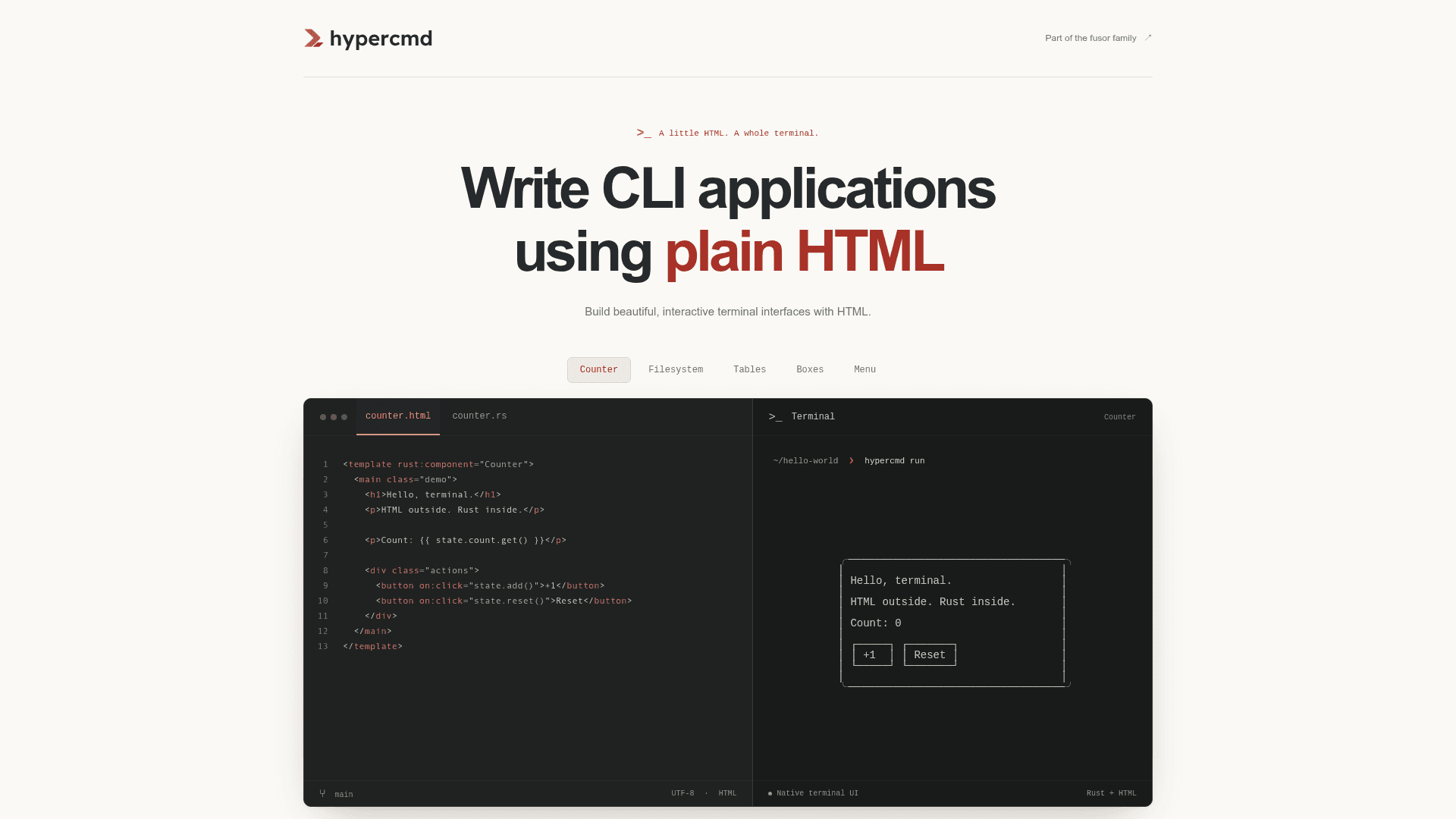
    hypercmd is an open-source terminal renderer from the fusor-rs organization for building interactive command-line apps. You write the interface in HTML files and keep state and logic in Rust. It is labeled v0.1 and experimental, and its APIs are expected to change.

    What It Is

    hypercmd is a terminal renderer for fusor. fusor compiles HTML and Rust, and hypercmd lays the result out in terminal cells, handles keyboard input and keeps the screen in sync. Views are HTML templates with Rust expressions for text, attributes, conditions, lists, routes and events. State lives in Rust structs using signals, so when a signal changes, the bindings that read it re-run and the next frame shows the result.

    Workflow

    The CLI is installed via an install script or cargo install hypercmd-cli. hypercmd new my-app scaffolds a counter app and checks that it builds, and hypercmd run runs it. Apps are ordinary Cargo packages: an HTML entry template, a main.rs that includes it with template!, a build.rs that compiles templates, and an optional terminal stylesheet. Rust 1.85 or newer is required to build apps.

    Rendering and Interaction

    • Styling uses a bounded CSS profile: flexbox, ch and percentage sizes, padding, gaps, colors, emphasis and scrollable overflow.
    • Unsupported markup or CSS fails at build time rather than rendering differently.
    • Keyboard support includes focus order, Tab and arrow navigation, multiline editing, bracketed paste and mouse scrolling.
    • The terminal is restored on exit, on panic and around Ctrl+Z.
    • The same component can be compiled for the terminal and for fusor's browser renderer.

    Current Status

    The README describes hypercmd as experimental, with minor releases before 1.0 possibly changing the HTML profile and Rust APIs. macOS and Linux are supported; native Windows execution is unavailable. Margins, positioning, grids, merged table cells, media and SVG are not supported yet. Examples include a file browser, a job inspector and shared job controls used by both a terminal and a browser app.
    hypercmd - 1

    Community Discussions

    Be the first to start a conversation about hypercmd

    Share your experience with hypercmd, ask questions, or help others learn from your insights.

    Pricing

    OPEN SOURCE

    Open Source (MIT)

    hypercmd is free and open source under the MIT License; install via cargo or the install script.

    • MIT License
    • Terminal UI renderer for fusor using HTML and Rust
    • Install with cargo install hypercmd-cli --locked
    • Runs on macOS and Linux (Rust 1.85+)
    • v0.1, experimental

    Capabilities

    Key Features

    • HTML templates with Rust expressions for UI
    • Signal-based fine-grained updates
    • Flexbox-based terminal CSS profile
    • Keyboard-first focus and navigation
    • Multiline grapheme-aware text editing and bracketed paste
    • Routing and async views
    • Owner-scoped tasks, timers and background workers
    • Build-time errors for unsupported markup or CSS
    • Shared components for terminal and browser renderers
    • CLI for creating, running, building and upgrading apps

    Integrations

    fusor
    Ratatui
    Cargo
    API Available
    View Docs

    Ratings & Reviews

    No ratings yet

    Be the first to rate hypercmd and help others make informed decisions.

    Rate other tools you’ve used

    Developer

    Fusor

    A lab for high-performance Rust applications.

    Founded 2026
    Read more about Fusor
    WebsiteGitHubX / Twitter
    1 tool in directory

    Similar Tools

    uv icon

    uv

    An extremely fast Python package and project manager written in Rust, replacing pip, pip-tools, pipx, poetry, pyenv, and virtualenv in a single tool.

    StaticScript icon

    StaticScript

    A TypeScript compiler that uses TypeScript as a frontend and LLVM as a backend to compile TypeScript code into native binaries.

    mogcli icon

    mogcli

    A CLI tool by Jared Palmer for scaffolding and managing monorepo projects with ease.

    Browse all tools

    Related Topics

    Development Environments

    AI-enhanced code editors and IDEs that improve the coding experience.

    210 tools

    AI Development Libraries

    Programming libraries and frameworks that provide machine learning capabilities, model integration, and AI functionality for developers.

    337 tools

    Command Line Assistants

    AI-powered command-line assistants that help developers navigate, search, and execute terminal commands with intelligent suggestions and context awareness.

    261 tools
    Browse all topics
    Back to all toolsSuggest an edit
    ratings
    discussions