
Ledge
A Markdown notebook for developers and DevOps that runs shell commands, code, SQL, and AI prompts from fenced blocks inside notes.
At a Glance
Free and open source Markdown notebook (Apache-2.0) for macOS, Linux, Windows (WSL), iPhone/iPad and Android (beta).
Engagement
Available On
Listed Oct 2026
About Ledge
Ledge is a free, open-source Markdown notebook for developers and DevOps, published from the ledgesh GitHub organization under the Apache-2.0 license. The README describes it as "Runnable Markdown notes" for macOS, Linux, Windows, iPhone, and Android. Pressing a key on a fenced code block streams its output beneath it. The latest GitHub release listed is v0.1.6, published on 2026-10-02.
What It Is
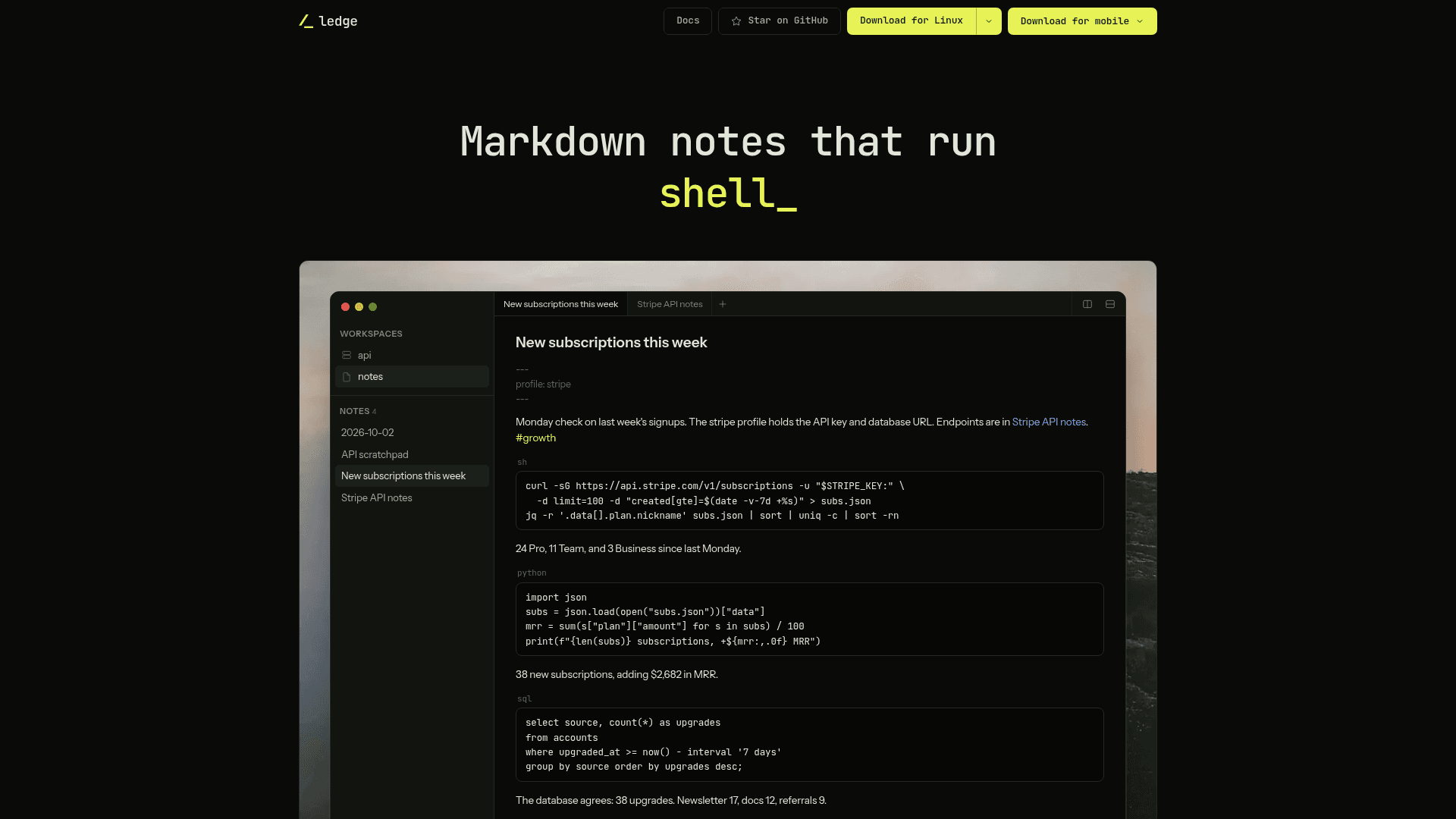
Ledge is a notes app whose code blocks are executable. According to the README, shell commands, Python, Node, Ruby, PHP, and TypeScript run out of the box, SQL and Redis blocks run against the database the note points at, and prompt blocks send their text to an AI agent. Notes are plain .md files in folders you choose, with no account, service, or database on the side, per the project's own description.
How Notes Run Code
Each note keeps its own persistent shell, so a cd, an exported variable, or an activated virtualenv carries into the next run. Frontmatter lines such as cwd:, env:, envFile:, profile:, and host: control where shells start and what they carry. A running block accepts input, so a sudo password or a [y/N] prompt can be answered in the output panel. Blocks can be sent to a terminal drawer instead, or marked norun or confirm.
Servers, Remote Hosts, and Phones
The docs describe two distinct remote features. A host: line sends a note's blocks over ssh to another machine while the note stays local. Separately, Ledge can keep the notes on a Linux or Mac server reached over ssh, where the server holds the files and runs the shells and the app is a window onto it. The vendor says running blocks survive a dropped connection. The iPhone, iPad, and Android apps hold no notes themselves and connect to that server, paired with a code from ledge pair. The ledge backup command is described as keeping an encrypted copy of the notes in an S3-compatible bucket.
Agents, Secrets, and Locking
Ledge ships an MCP server, and the README shows claude mcp add ledge -- ledge mcp to connect Claude Code. The site states that notes are addressed by title, there is no delete tool, and locked notes refuse their bodies to agents. Profiles are dotenv files kept outside the notes folder so a note carries only the profile name. Locking encrypts a note's body on disk behind a passphrase, and the site says there is no recovery.
The Notes App Underneath
Beyond execution, Ledge includes live preview, wikilinks, backlinks, tags, full-text search, daily notes and templates, split panes with tabs, paste-as-Markdown, and a trash with undo. A ledge command-line tool can list, read, search, create, and append to notes. Because notes are ordinary files, syncing can use iCloud Drive, Dropbox, Syncthing, or git.
Platform Requirements and Current Status
The docs list macOS 13 or newer on Apple Silicon, Windows 11 on x64 with WSL, Linux on x64 or arm64 with WebKitGTK 4.1, iOS 17 or newer, and Android 10 or newer, with the Android app in open beta. The project is built on Electrobun with a Bun process and a React and CodeMirror front end.
Community Discussions
Be the first to start a conversation about Ledge
Share your experience with Ledge, ask questions, or help others learn from your insights.
Pricing
Open Source
Free and open source Markdown notebook (Apache-2.0) for macOS, Linux, Windows (WSL), iPhone/iPad and Android (beta).
- Runs code blocks in place (shell, Python, Node, Ruby, PHP, TypeScript)
- Run blocks on remote hosts over ssh
- Ledge Server for keeping notes on a remote server
- Profiles and secrets kept outside notes
- MCP server for AI agents
Capabilities
Key Features
- Run fenced code blocks in place with streaming output
- Persistent shell per note
- Runs shell, Python, Node, Ruby, PHP, TypeScript, SQL, and Redis blocks
- Prompt blocks that send text to an AI agent
- Run blocks on remote hosts over ssh via frontmatter
- Keep notes on a remote server over ssh
- iPhone, iPad, and Android clients paired with a server
- Profiles keep secrets outside notes
- Note locking with passphrase encryption
- Built-in MCP server for agents
- ledge CLI for listing, reading, searching, and appending notes
- Encrypted S3-compatible backups with ledge backup
- Wikilinks, backlinks, tags, and full-text search
- Daily notes and templates
- Split panes and tabs
- Live preview Markdown editing
- Plain-file sync via git, iCloud Drive, Dropbox, or Syncthing