OpenClaw iPhone App - AI that does things
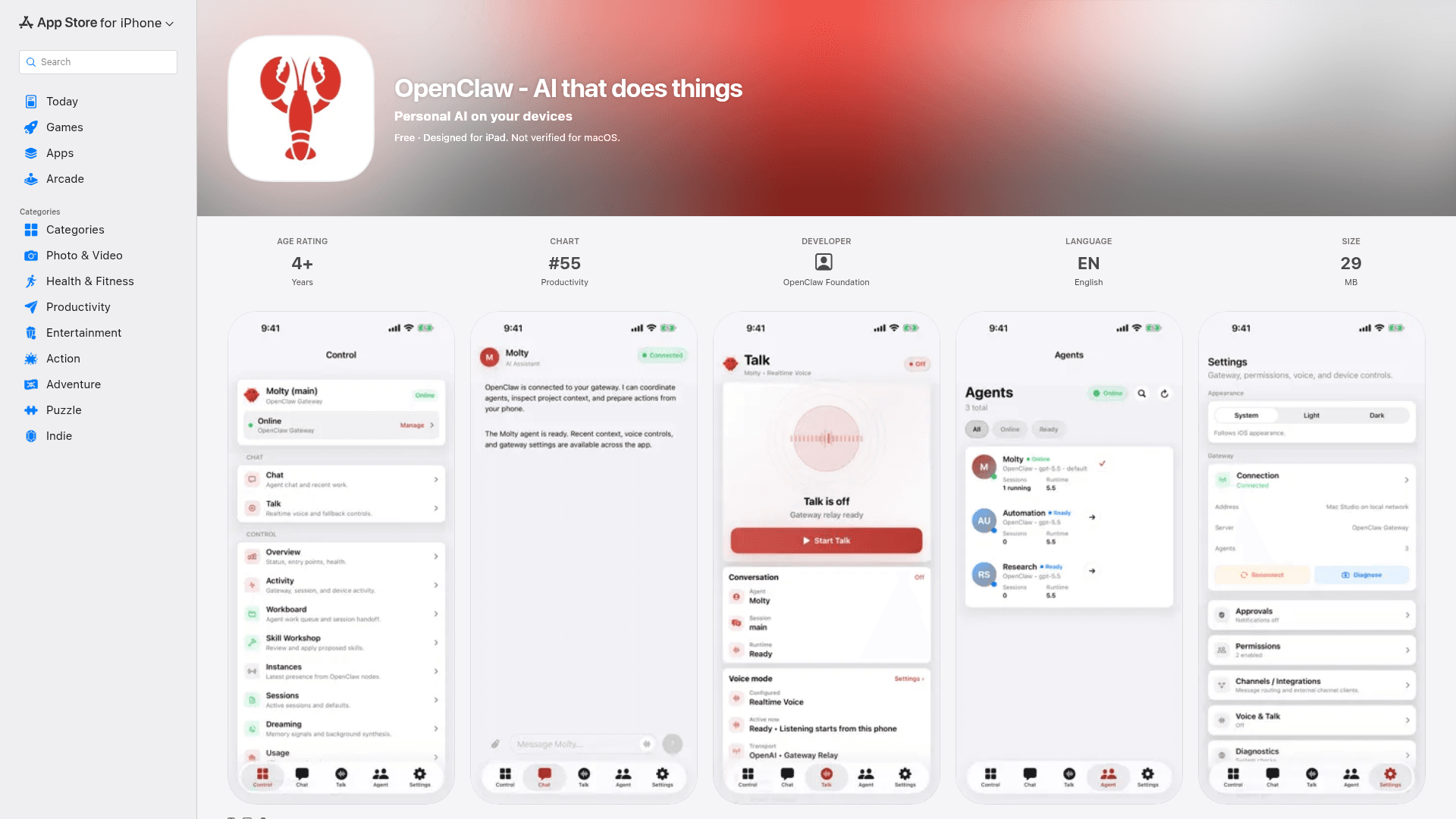
OpenClaw is a local-first personal AI assistant iPhone app that pairs with your OpenClaw Gateway for private chat, realtime voice, device automation, and action approvals.
At a Glance
About OpenClaw iPhone App - AI that does things
Developed by OpenClaw Foundation, the iPhone app pairs with a self-hosted OpenClaw Gateway to give users a secure, device-aware AI node they control entirely. It is designed for iOS, with companion support for iPhone, iPad, Apple Watch, and Mac on Apple Silicon.
What It Is
OpenClaw is an iPhone companion app for the OpenClaw Gateway — a self-hosted AI infrastructure layer that users run on their own devices. Rather than routing data through a third-party cloud, OpenClaw keeps the user in control of their gateway, API keys, configuration, and permissions. The iPhone app acts as a secure interface for chat, voice interaction, workflow approvals, and device capability access, all tied to the private gateway the user sets up themselves.
Local-First Architecture and Privacy Model
The defining characteristic of OpenClaw is its local-first design. The OpenClaw Foundation states that the app does not collect any data from users, as reflected in the App Store privacy disclosure. Device access — including camera, screen, location, photos, contacts, calendar, and reminders — is managed entirely through iOS permissions and can be enabled selectively. Users pair the app with their gateway via QR code or a setup code, keeping the connection private and direct.
Core Capabilities
Once paired with a gateway, the iOS app enables a range of AI-assisted interactions:
- Chat — Converse with the AI assistant directly from iPhone
- Talk mode — Realtime and background voice interaction
- Action approvals — Review and approve gateway-initiated actions from the iPhone
- iOS sharing — Share text, links, and media from iOS directly into OpenClaw
- Device capabilities — Opt-in access to camera, screen, location, photos, contacts, calendar, and reminders
- Push wakes and node status — Receive notifications for connected workflow events
Platform and Compatibility
The app is listed as designed for iPad and is compatible across the Apple device ecosystem. System requirements include iOS 18.0 or later for iPhone, iPadOS 18.0 or later for iPad, macOS 15.0 or later with an Apple M1 chip or later for Mac, and watchOS 11.0 or later for Apple Watch. The app is available in English.
Getting Started
Setup follows a three-step path: first, the user sets up their OpenClaw Gateway independently; second, they open the iPhone app and pair it with the gateway using a QR code or setup code; third, they begin using chat, Talk mode, approvals, and automations from their iPhone. This gateway-first model means the iPhone app is a companion to, not a replacement for, the broader OpenClaw infrastructure.
Current Status
OpenClaw is actively available on the App Store. At the time of listing, the app had not yet accumulated enough ratings or reviews to display an overview score. The copyright is listed as OpenClaw, indicating active development and a forward-looking release posture.
Community Discussions
Be the first to start a conversation about OpenClaw iPhone App - AI that does things
Share your experience with OpenClaw iPhone App - AI that does things, ask questions, or help others learn from your insights.
Pricing
Free
Free iOS app that pairs with your self-hosted OpenClaw Gateway for chat, voice, approvals, and device automation.
- Pair with OpenClaw Gateway via QR code or setup code
- Chat with AI assistant from iPhone
- Realtime and background Talk mode
- Review Gateway action approvals
- Share text, links, and media from iOS
Capabilities
Key Features
- Pair with OpenClaw Gateway via QR code or setup code
- Chat with AI assistant from iPhone
- Realtime and background Talk (voice) mode
- Review and approve Gateway action requests from iPhone
- Share text, links, and media from iOS into OpenClaw
- Opt-in device capabilities: camera, screen, location, photos, contacts, calendar, reminders
- Push notifications and node status updates for connected workflows
- Local-first: no data collected by the app
- Supports iPhone, iPad, Apple Watch, and Apple Silicon Mac