
OpenUsage
A free, open-source macOS menu bar app that tracks your AI coding subscription usage across Claude, Cursor, Codex, Copilot, and more in one glance.
At a Glance
About OpenUsage
OpenUsage is a native macOS menu bar application that lets developers monitor their AI coding subscription limits — session quotas, weekly caps, token spend, and credit balances — without digging through multiple dashboards. Built in Swift and SwiftUI, it is free and open source under the MIT License, maintained by Robin Ebers alongside a growing community of contributors. The latest stable release is v0.7.0, published June 27, 2026, with a beta channel at v0.7.1-beta.6.
What It Is
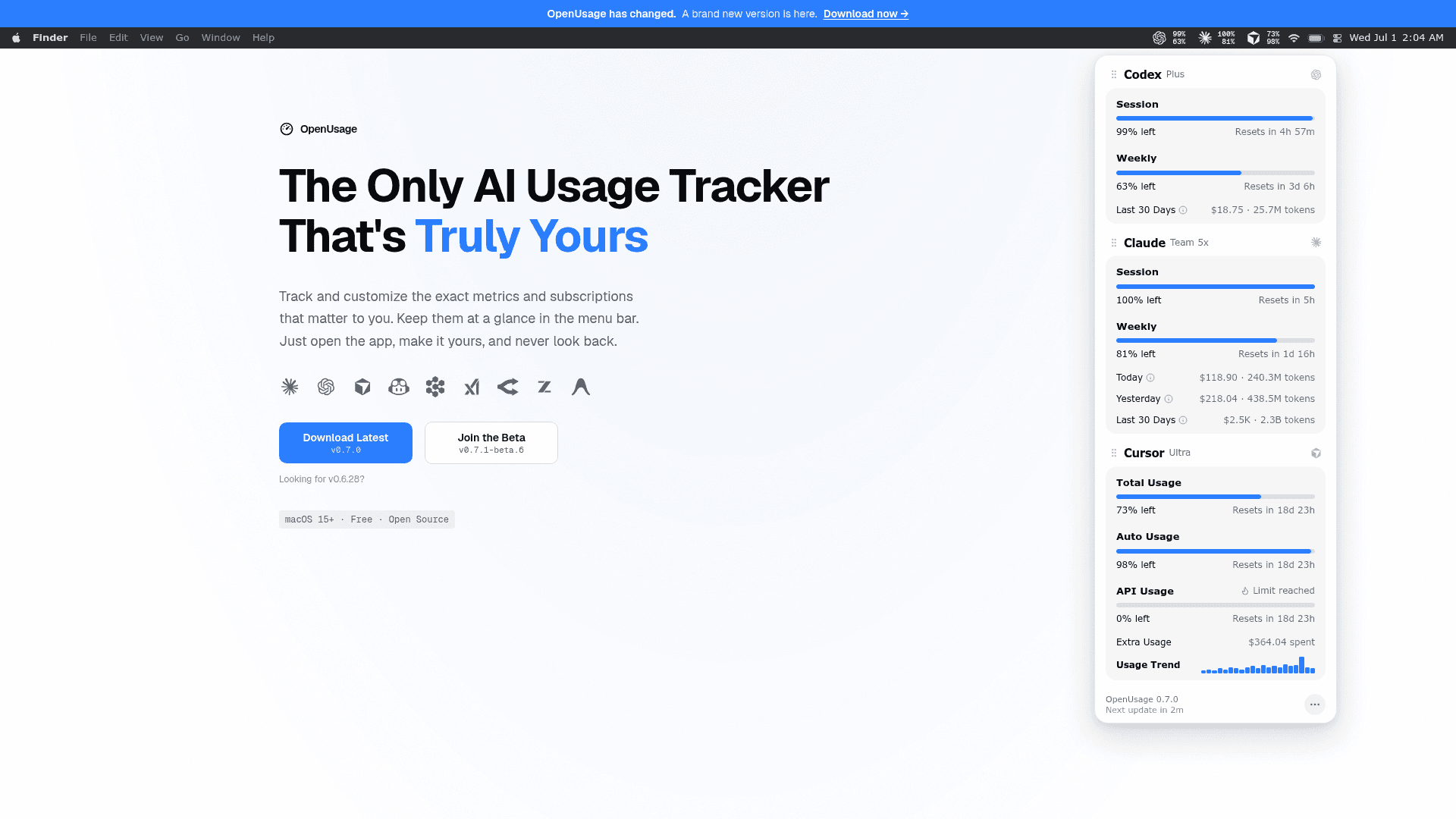
OpenUsage is a lightweight macOS status-bar utility that aggregates usage data from AI coding tools into a single popover panel. It reads credentials already stored on your machine — keychain entries, auth files, app state — so most providers require no extra login. The app normalizes each provider's data into a consistent format of progress bars, countdowns, and spend figures, then lets you pin the metrics you care about directly into the menu bar strip.
Supported Providers and Plugin Architecture
The app covers the major AI coding subscriptions developers pay for:
- Claude — session, weekly, Sonnet, extra usage, local daily spend via ccusage
- Codex — session, weekly, credits, local daily spend
- Cursor — credits, total/auto/API usage, requests, on-demand, per-day spend
- Copilot, Devin, Grok, OpenRouter, Z.ai, Antigravity — quotas, credits, and balances
The homepage states that "everything in the app is plugin-driven," with more providers on the way. OpenRouter and Z.ai require an API key because they have no local credential to reuse; all other providers pull from what is already on the machine.
Architecture and Local API
OpenUsage is a SwiftPM executable using SwiftUI content hosted in an AppKit NSStatusItem and NSPopover, written with Swift 6 strict concurrency. Providers implement a ProviderRuntime protocol (auth store → usage client → mapper → ProviderSnapshot), and the UI renders normalized MetricLine values.
A local HTTP API runs at 127.0.0.1:6736 and exposes usage data as JSON at /v1/usage and /v1/usage/{provider}. The README describes it as "loopback-only and serves usage numbers, never credentials," enabling other apps, editor status lines, and scripts to read the data without any tokens or authentication. The README notes that browser pages can also read the loopback API and links to a privacy note in the docs.
Key Features
- Menu bar pins — up to 2 metrics per provider, rendered as compact text or mini progress bars
- Dashboard popover — provider-grouped meters with live reset countdowns, pace indicators, and context menus
- Global shortcut — toggle the popover from anywhere with a custom key combo
- Stale-while-revalidate caching — cached values display instantly; refresh runs every 5 minutes
- Proxy support — route provider requests through SOCKS5 or HTTP(S) via a config file
- Automatic updates — signed, notarized in-app updates via Sparkle, with an optional early access channel
- Homebrew install —
brew install --cask openusage
Update: OpenUsage 0.7.0
The GitHub repository shows v0.7.0 as the latest stable release (published June 27, 2026) and v0.7.1-beta.6 as the current beta. The homepage notes "A brand new version is here," signaling a significant rewrite — the project moved from an earlier architecture to a native Swift/SwiftUI app. The repository has accumulated over 3,000 stars and 310 forks since its creation in February 2026, with 45 contributors listed on the homepage. Releases are automated via GitHub Actions: pushing a v* tag builds, signs, notarizes, and publishes; a pre-release suffix routes to the Early Access channel.
Community Discussions
Be the first to start a conversation about OpenUsage
Share your experience with OpenUsage, ask questions, or help others learn from your insights.
Pricing
Free
Fully free and open source under the MIT License. No paid tiers.
- All providers supported
- Menu bar pins
- Dashboard popover
- Local HTTP API
- Automatic updates via Sparkle
Capabilities
Key Features
- Menu bar pins for up to 2 metrics per provider
- Dashboard popover with live reset countdowns and pace indicators
- Global keyboard shortcut to toggle popover
- Supports Claude, Codex, Cursor, Copilot, Devin, Grok, OpenRouter, Z.ai, Antigravity
- Local HTTP API at 127.0.0.1:6736 for reading usage as JSON
- Stale-while-revalidate caching with 5-minute refresh
- Proxy support via SOCKS5 or HTTP(S)
- Automatic signed and notarized in-app updates via Sparkle
- Early access beta channel
- Homebrew cask install
- Plugin-driven provider architecture
- Drag-reorder providers and metrics
- 12/24-hour time, theme, density, and launch-at-login settings
- Universal binary for Apple Silicon and Intel Macs