
pitwall
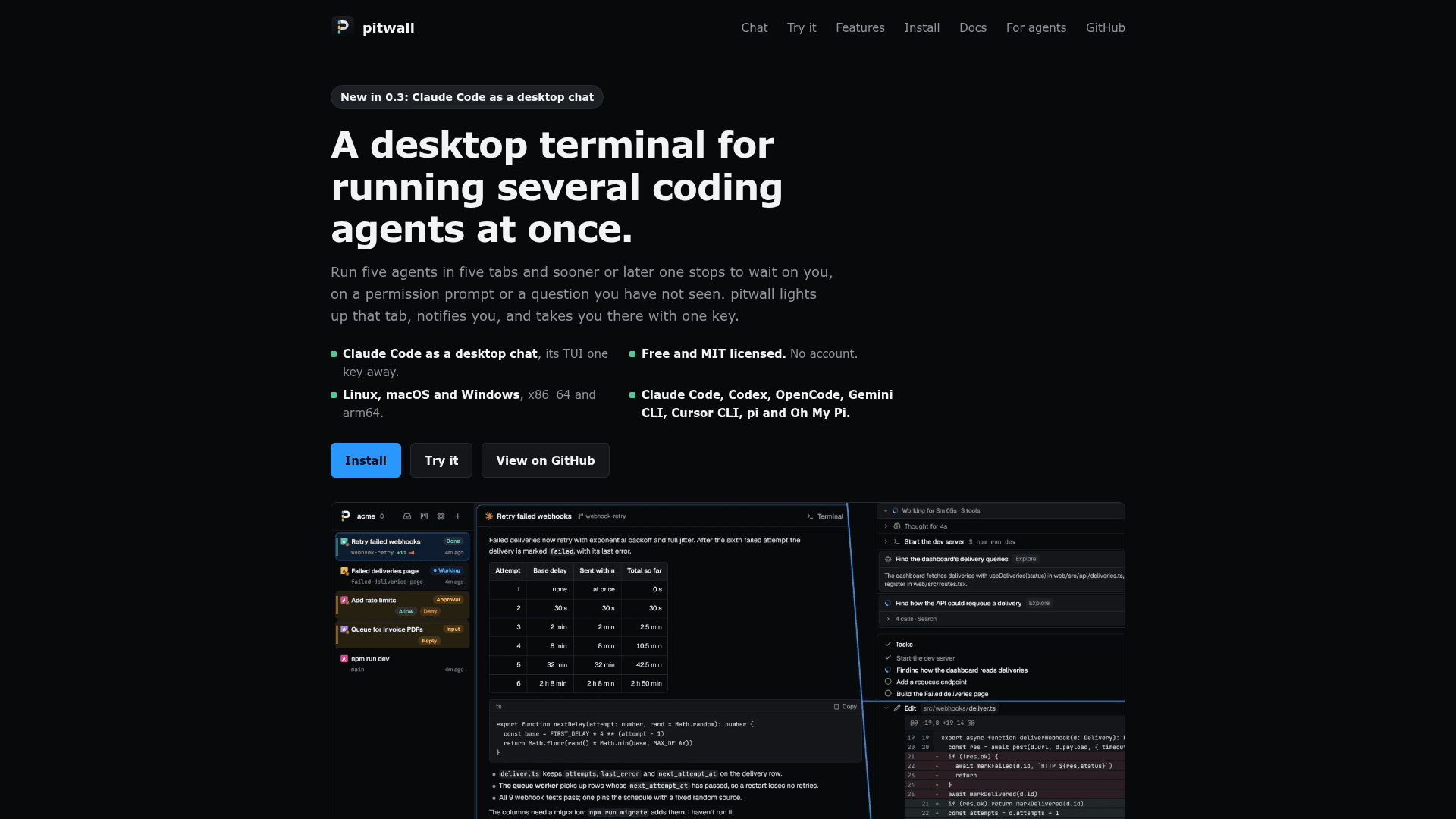
A free, MIT-licensed desktop terminal for running several coding agents at once, with a sidebar showing each agent's state and one-key jumps to the one waiting on you.
At a Glance
Free and open source desktop terminal for running several coding agents at once, under the MIT license. No account required.
Engagement
Available On
Listed Nov 2026
About pitwall
pitwall is a desktop terminal from Quantic Studios for running several coding agents side by side. A sidebar shows whether each agent is working, waiting for input or approval, done or failed, and one key takes you to the agent that needs you. It runs on Linux, macOS and Windows, and the latest release listed on GitHub is v0.3.1.
What It Is
pitwall is a terminal multiplexer and desktop app built around coding agents such as Claude Code, Codex, OpenCode, Gemini CLI, Cursor CLI, pi and Oh My Pi. Each tab's sidebar row shows the agent's state, its branch, lines changed, and pull request status with CI and review. When an agent stops on a permission prompt or a question, the row lights up, a desktop notification arrives, and Ctrl+Shift+U jumps to it.
Claude Code panes are drawn as a desktop chat built from the session transcript, with the TUI one key away (Alt+T). Codex and Antigravity panes can become chats the same way. The chat and the TUI are two views of the same running session.
Managing Several Agents
Permission prompts can be answered from the sidebar row with Allow and Deny, and a board view groups agent tabs into columns by what they need from you. Agents can be split into workers, each in its own git worktree with its own port block, and pitwall warns when branches touch the same files. Fleet mode routes workers to lanes by task size, each lane running a preset agent and model. Agents can also open tabs, wait on each other and send messages with pitwall new, pitwall wait and pitwall send.
Review, Safety and Insight
A review view shows the tab's changes, lets you comment on lines and send the comments to the agent as one prompt, and offers per-hunk staging and a second-opinion agent. The --guard option makes supported agents refuse commands such as git push; the docs describe it as a seatbelt, not a sandbox. Settings pages report agent errors, where turn time goes, and usage against Claude Code and Codex plan limits.
Sessions and Phone Access
Sessions persist like tmux: tabs return in their folders with agents resumed after a restart, and pitwall --host runs sessions on another machine over ssh. An Android app and a web page can pair with your computer over your own network, with no account and no relay, to list tabs and answer approvals.
Setup Path
Install with Homebrew, Scoop or the install scripts, run pitwall, and use the welcome card to install hooks so agents report their state. The README says Linux is used daily, while the macOS and Windows builds are newer and have had little use.
Community Discussions
Be the first to start a conversation about pitwall
Share your experience with pitwall, ask questions, or help others learn from your insights.
Pricing
Free (MIT licensed)
Free and open source desktop terminal for running several coding agents at once, under the MIT license. No account required.
- MIT licensed
- No account
- Linux, macOS and Windows, x86_64 and arm64
- Works with Claude Code, Codex, OpenCode, Gemini CLI, Cursor CLI, pi and Oh My Pi
- Claude Code as a desktop chat
Capabilities
Key Features
- Per-tab agent state sidebar (Working, Input, Approval, Plan, Done, Error)
- One-key jump to the agent waiting on you
- Claude Code, Codex and Antigravity panes as a desktop chat
- Allow/Deny answers from sidebar rows
- Board view grouped by what needs you
- Worker fleets in separate git worktrees with port blocks and collision warnings
- Fleet mode with model lanes
- Diff review with line comments and per-hunk staging
- Guard mode refusing commands like git push
- Agent error and timing reports
- Plan usage and cost tracking
- Task queue and scheduled tasks
- Agent-to-agent handoff via pitwall new, wait and send
- Persistent sessions and ssh remote hosts
- Android app and web page for phone approvals