
EveryDev.ai
Sign inSubscribe
Home
Tools

1,367+ AI tools

  • Trending
  • New
  • Featured
Categories
  • Coding721
  • Agents636
  • Marketing299
  • Infrastructure296
  • Design235
  • Analytics228
  • Research222
  • Projects205
  • Integration148
  • Testing128
  • Data125
  • Learning115
  • MCP113
  • Security105
  • Extensions91
  • Prompts79
  • Communication73
  • Commerce70
  • Voice68
  • Web59
  • DevOps46
  • Finance11
Sign In
  1. Home
  2. Tools
  3. Polyscope
Polyscope icon

Polyscope

AI Coding Assistants

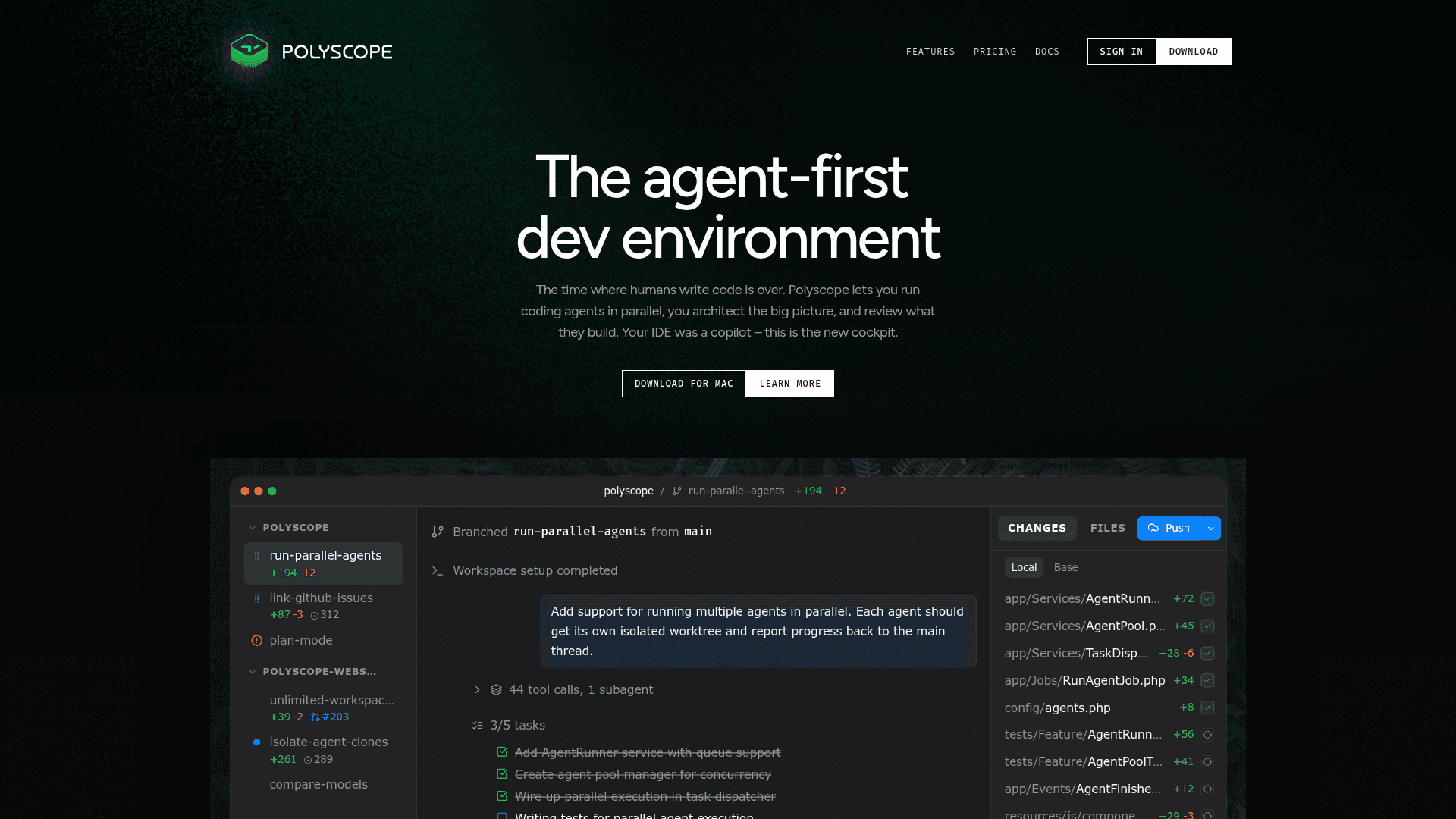
Polyscope is an agent-first development environment for macOS that lets you run multiple AI coding agents in parallel, each in its own isolated workspace.

Visit Website

At a Glance

Pricing

Open Source
Free tier available

For solo developers and small projects

Pro: $99/yr
Team: $299/yr

Engagement

Available On

macOS

Resources

WebsiteDocsGitHubllms.txt

Topics

AI Coding AssistantsAutonomous SystemsDevelopment Environments

Listed Mar 2026

About Polyscope

Polyscope is a native macOS desktop app that redefines software development by letting you run multiple AI coding agents simultaneously, each working in its own isolated copy-on-write workspace clone. Instead of waiting for one agent to finish a task, you can tackle an entire backlog at once — architecting the big picture while agents handle the implementation. It supports Claude Code and OpenAI Codex, and connects to your Mac from any browser via an end-to-end encrypted relay so you can manage agents on the go.

  • Parallel Agents — Run multiple AI agents at the same time across separate isolated workspaces, tackling multiple features or bug fixes simultaneously.
  • Linked Workspaces — Connect workspaces from multiple repositories so agents can collaborate across repos, e.g., building an API in one and a mobile app in another.
  • Autopilot — Describe a high-level goal and Polyscope breaks it into user stories, then executes each one with progress tracking, crash recovery, and drag-and-drop reordering.
  • Opinions — Query multiple AI models with a question, implementation plan, or code review; the models discuss and provide the best solution for your project.
  • Mobile Access — Connect to your Mac from any browser through an end-to-end encrypted relay to monitor agents, guide their work, and kick off new tasks from anywhere.
  • Visual Workflows — Select any element on your site and tell the agent what to change — add features, fix styling, or tweak copy by pointing and describing.
  • Isolated Copy-on-Write Clones — Every agent works in its own instant clone with no extra disk space, leveraging native macOS features to prevent conflicts.
  • GitHub Integration — Sign in with GitHub, create pull requests, and work with GitHub issues directly from within Polyscope.
  • Multi-Model Support — Works with Claude Code and OpenAI Codex, with Kimi 2.5 support coming soon; AI usage is billed by your provider separately.

To get started, download the .dmg from the website, drag Polyscope to your Applications folder, launch it, and sign in with GitHub. Then add your first repository and create a workspace to begin running agents in parallel.
Polyscope - 1

Community Discussions

Be the first to start a conversation about Polyscope

Share your experience with Polyscope, ask questions, or help others learn from your insights.

Pricing

FREE

Free Plan Available

For solo developers and small projects

  • Unlimited projects
  • Unlimited parallel agents
  • GitHub integration
  • Multi-model support
  • Autopilot

Pro

Single developers who ship

$99
per year
  • Unlimited projects
  • Unlimited parallel agents
  • GitHub integration
  • Multi-model support
  • Autopilot
  • Opinions
  • Visual element editing
  • E2E encrypted mobile access
  • Fund indie dev tools
  • Email support

Team

Teams that need more power — includes 10 team seats

$299
per year
  • Everything in Pro
  • Centralized billing
  • Seat & user management
  • Priority email support
  • Includes 10 team seats
View official pricing

Capabilities

Key Features

  • Parallel AI coding agents
  • Isolated copy-on-write workspace clones
  • Linked multi-repo workspaces
  • Autopilot mode with user story generation
  • Opinions: multi-model discussion and review
  • End-to-end encrypted mobile/browser access
  • Visual element editing
  • GitHub integration
  • Multi-model support (Claude Code, OpenAI Codex)
  • Progress tracking and crash recovery
  • Drag-and-drop story reordering
  • Community GitHub support repository

Integrations

GitHub
Claude Code
OpenAI Codex
Kimi 2.5 (coming soon)
Git

Reviews & Ratings

No ratings yet

Be the first to rate Polyscope and help others make informed decisions.

Developer

Beyond Code

Beyond Code builds developer tools that push the boundaries of what's possible with modern software development. The team creates products like Polyscope, an agent-first macOS development environment, and maintains a suite of open-source and commercial tools for developers. They focus on native Mac experiences and agentic workflows, with a commitment to privacy-focused analytics and transparent licensing.

Founded 2017
Mönchengladbach, Germany
Bootstrapped (N... raised
5 employees

Used by

Laravel LLC
Tighten
Spatie
Various global PHP development teams
Read more about Beyond Code
WebsiteGitHub
1 tool in directory

Similar Tools

Replit Agent 3 icon

Replit Agent 3

AI-powered autonomous coding agent that builds full-stack applications through natural language conversations within Replit's development environment.

Embedr icon

Embedr

AI-native IDE for embedded developers with board-level and pin-aware context for Arduino, ESP32, ESP8266, and more.

Ona icon

Ona

Ona is an AI software engineering platform that autonomously executes development tasks end-to-end, from background agents to automated code review, CVE remediation, and large-scale migrations.

Browse all tools

Related Topics

AI Coding Assistants

AI tools that help write, edit, and understand code with intelligent suggestions.

288 tools

Autonomous Systems

AI agents that can perform complex tasks with minimal human guidance.

83 tools

Development Environments

AI-enhanced code editors and IDEs that improve the coding experience.

93 tools
Browse all topics
Back to all tools
Explore AI Tools
  • AI Coding Assistants
  • Agent Frameworks
  • MCP Servers
  • AI Prompt Tools
  • Vibe Coding Tools
  • AI Design Tools
  • AI Database Tools
  • AI Website Builders
  • AI Testing Tools
  • LLM Evaluations
Follow Us
  • X / Twitter
  • LinkedIn
  • Reddit
  • Discord
  • Threads
  • Bluesky
  • Mastodon
  • YouTube
  • GitHub
  • Instagram
Get Started
  • About
  • Editorial Standards
  • Corrections & Disclosures
  • Community Guidelines
  • Advertise
  • Contact Us
  • Newsletter
  • Submit a Tool
  • Start a Discussion
  • Write A Blog
  • Share A Build
  • Terms of Service
  • Privacy Policy
Explore with AI
  • ChatGPT
  • Gemini
  • Claude
  • Grok
  • Perplexity
Agent Experience
  • llms.txt
Theme
With AI, Everyone is a Dev. EveryDev.ai © 2026
Main Menu
  • Tools
  • Developers
  • Topics
  • Discussions
  • News
  • Blogs
  • Builds
  • Contests
Create
Sign In
    Sign in
    0views
    0upvotes
    0discussions