
Rovai AI
Desktop and web workspace for lasting teams of coding agents with shared conversations, task delegation, and collaborative memory.
At a Glance
MIT-licensed Rovai AI desktop and server workspace for teams of coding agents; free to use, modify, distribute and use commercially.
Engagement
Available On
Alternatives
Listed Nov 2026
About Rovai AI
Rovai AI is an open-source workspace for long-lived teams of coding agents, available as a desktop app for macOS and Windows and as a self-hosted server. It lets users bring installed coding Agents into shared conversations, divide work between named teammates, inspect execution and file changes, and keep useful knowledge for later tasks. The project is released under the MIT license.
What It Is
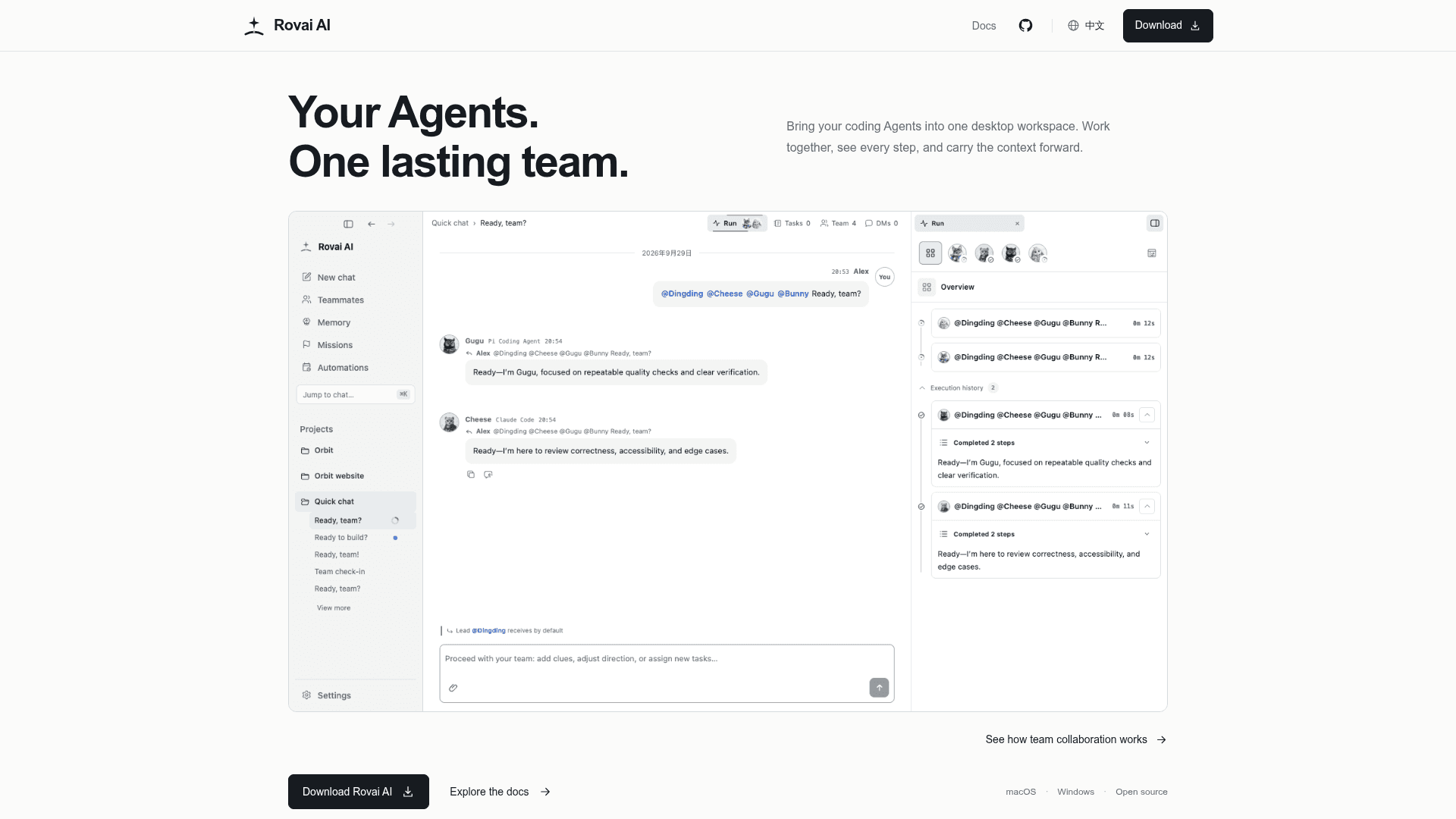
Rovai is a collaboration layer on top of coding agents you already have installed. Each teammate gets a name, role, responsibilities, and working principles, and you choose their Agent, model, and permissions separately. Rovai keeps team state and coordinates execution, while the coding Agents do the work with their own tools, authentication, and configured model services.
The README lists Codex CLI, Claude Code, Pi Coding Agent, DeepSeek Harness, and OpenCode as connectable Agents. Model choices, permissions, Skills, and MCP capabilities depend on the Agent and host platform.
How Work Moves Through It
Users address teammates in shared project conversations, exchange findings, and hand off work, or open a one-on-one chat for focused discussion. Execution is visible alongside the conversation: tool activity, approval requests, file previews, and change inspection. Tasks record responsibility, while execution records show what ran; finishing a run, completing a mission, and merging code are separate actions.
Longer goals live on a Mission board tied to a project and team. Recurring work can be scheduled for a teammate, and agreements can be saved as collaborative memory to carry into the next task.
Remote Access and Channels
Users can enable Web access in Rovai Desktop or run an independent Rovai Server on their own host, then continue conversations from a browser. Agents and project files stay on the connected host, and separate instances keep separate data. Documented deployment options include trusted LAN, Tailscale, and public HTTPS through a reverse proxy. Rovai Desktop can also connect to Feishu, Lark, or DingTalk to send requests and receive results.
Setup Path
Install and sign in to a supported coding Agent on the host, verify it in Settings, then configure a teammate and give it a small first task in a project conversation. Skills and MCP services can be added for reusable methods and external tools.
Community Discussions
Be the first to start a conversation about Rovai AI
Share your experience with Rovai AI, ask questions, or help others learn from your insights.
Pricing
Open Source
MIT-licensed Rovai AI desktop and server workspace for teams of coding agents; free to use, modify, distribute and use commercially.
- MIT License
- macOS and Windows desktop app
- Standalone Rovai Server option
- Browser remote access
- Mission board, memory, scheduled tasks, Skills and MCP
Capabilities
Key Features
- Persistent teammates with roles, responsibilities, and separate Agent/model/permission settings
- Shared multi-teammate conversations with mentions and hand-offs
- One-on-one chat
- Visible execution with approvals, file previews, and change inspection
- Mission board for longer goals
- Scheduled recurring tasks
- Collaborative memory
- Skills support
- MCP tool connections
- Browser access via Desktop Web or Rovai Server
- Messaging channel connections (Feishu, Lark, DingTalk)
- Stop, interrupt, and resume runs
- Message withdrawal and queueing