
SquadCue
Local-first cockpit that turns Claude Code CLI sessions into named, resumable employees with an approval inbox and a visual flow canvas.
At a Glance
Self-hosted local-first SquadCue core released under the MIT license; runs on your machine via pip install or git clone.
Engagement
Available On
Alternatives
Listed Nov 2026
About SquadCue
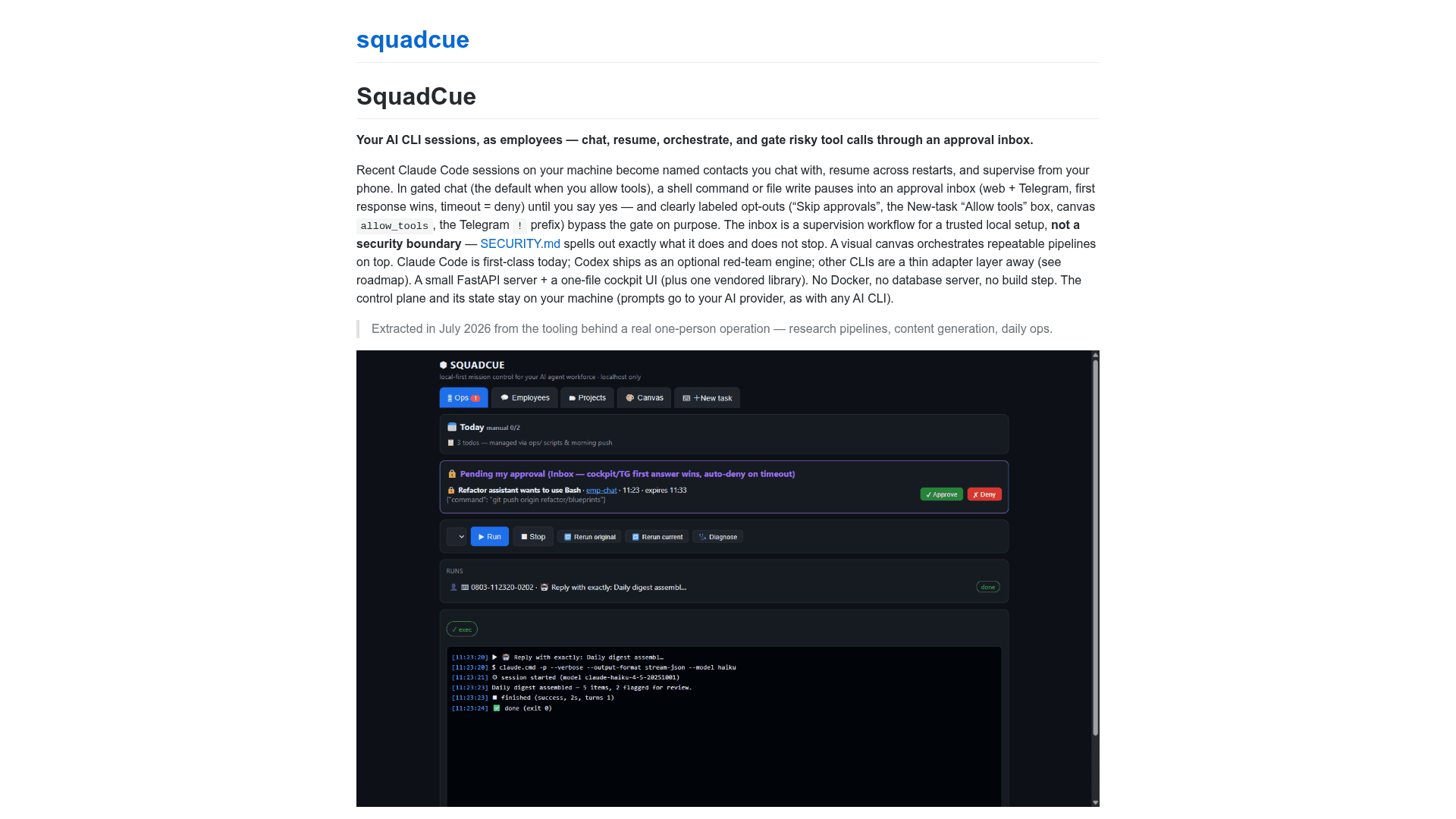
SquadCue is an open-source, local-first control plane by Hsien-Chu Chen (hsienchuc) that turns recent Claude Code sessions on your machine into named contacts you can chat with, resume, and supervise from a browser or Telegram. Risky tool calls such as shell commands and file writes pause in an approval inbox until you decide. A drag-and-drop canvas orchestrates repeatable pipelines on top. It is published on PyPI and licensed under MIT.
What It Is
SquadCue is a supervision cockpit for people who run AI coding CLIs throughout the day. It runs as a small FastAPI server with a single-file cockpit UI, with no Docker, database server, or build step. Workflow state is kept locally as JSON/JSONL and SQLite files, while prompts still go to your AI provider. Claude Code is the primary engine, and Codex is available as an optional red-team engine.
How the Employee and Approval Workflow Works
Sessions discovered after first-launch consent (by default the last 21 days, up to 40 conversation-sized files) become contacts that resume via claude -p --resume with streaming replies. When tools are allowed, a PreToolUse hook routes risky actions into an inbox on the web and Telegram. Each request shows its full payload, the first response wins, and a timeout resolves to deny. Documented opt-outs bypass the gate deliberately. The project states the inbox is a supervision workflow for a trusted local setup, not a security boundary.
Canvas, Runs, and Diagnosis
The canvas uses Drawflow with action, claude, codex, gate, shell, fetch, tg, wait, readfile, writefile, and kb nodes; swarm and tournament nodes are experimental. Every flow run stores a snapshot of the flow definition with per-node inputs, outputs, and duration. Runs can be retried from the snapshot or the current saved version. A diagnosis agent reports probable cause and a suggested fix for failed runs, and a Self-heal button dispatches a fix agent whose risky actions go through the inbox. A BM25 local knowledge-base search over markdown folders is exposed as a node.
Setup Path and Caveats
Install with pip install squadcue and run squadcue to serve the cockpit on loopback port 8899. Python 3.11+ and at least one AI CLI on PATH are required. It is single-user by design. Windows is the daily-driver platform: the canvas shell node uses PowerShell and session relaunch is Windows-only, so Linux and macOS may need adaptation. Employee chat turns are single-shot headless runs, so background processes they spawn generally die with the turn.
Community Discussions
Be the first to start a conversation about SquadCue
Share your experience with SquadCue, ask questions, or help others learn from your insights.
Pricing
Open Source (MIT)
Self-hosted local-first SquadCue core released under the MIT license; runs on your machine via pip install or git clone.
- MIT-licensed core; bundled Drawflow is also MIT
- Employees from Claude Code sessions with chat and resume
- Approval inbox (web + Telegram)
- Visual flow canvas
- Run diagnosis and self-heal
Capabilities
Key Features
- Claude Code sessions as named, resumable employee contacts
- Approval inbox for risky tool calls on web and Telegram (first response wins, timeout denies)
- Drag-and-drop flow canvas with gate, shell, fetch, claude, codex and other nodes
- Per-run flow snapshots with retry semantics
- Run diagnosis agent and Self-heal fix agent
- Morning Telegram digest and .ics export of daily todos
- Local BM25 knowledge base search over markdown folders
- Session rescue after reboot
- Loopback-only enforcement, CSRF/DNS-rebind guards, and SSRF guard on fetch
- Optional Codex read-only red-team pass via @codex