
Unpeel
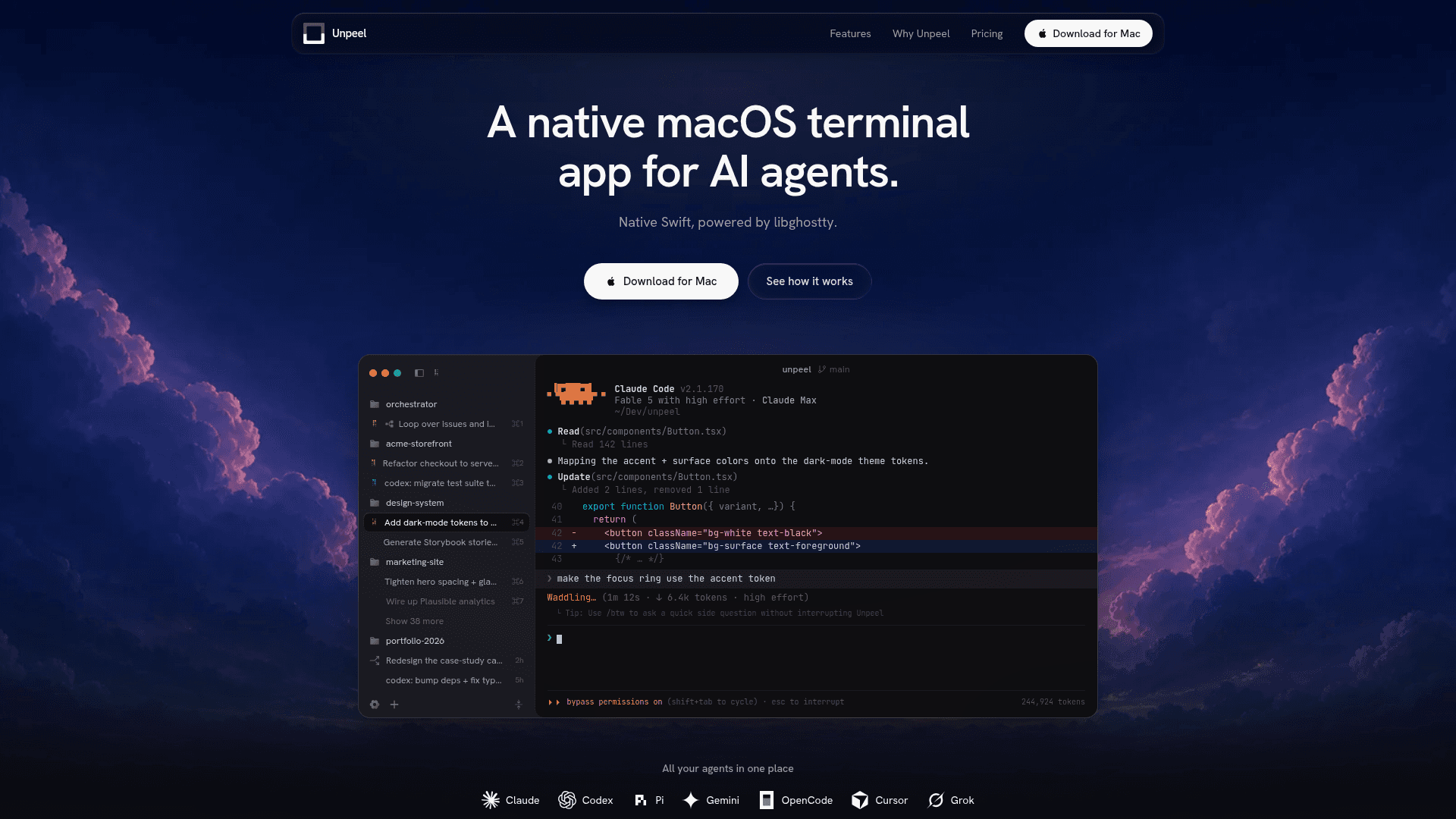
A native macOS terminal app for running and orchestrating multiple AI coding agents side by side, built with Swift and powered by libghostty.
At a Glance
About Unpeel
Unpeel is a native macOS terminal application built specifically for running AI coding agents. Created by Tommy Vedvik, it is written in real Swift and AppKit, rendered on Metal with a libghostty terminal — no web views or Chromium. The current version is 0.1.0-beta.3, available as a 7-day free trial download for Apple silicon Macs.
What It Is
Unpeel sits as an orchestration layer between you and multiple AI agent CLIs — Claude Code, Codex, Gemini, Amp, Pi, OpenCode, Copilot, and Cursor. Rather than wrapping a custom chat UI on top of these tools, it gives each CLI a first-class native terminal home with a dashboard sidebar, auto-titling, and one-tap launching. The core philosophy, as stated on the product page, is that "the future of AI-assisted work isn't one model or one harness — it's many, working together."
How the Session Model Works
Unpeel uses a hosted PTY (pseudo-terminal) model where each live terminal runs in a separate session host process, independent of the app window. Closing or restarting the app does not kill running agents — the window is just an attachable client that can reconnect and replay saved terminal output. The product page compares this to tmux conceptually, but Unpeel implements its own session host, socket, output log, and app integration without requiring tmux.
- Sessions survive app quits, crashes, and relaunches
- A menu-bar item shows a live pulse — spinning when agents are active, ringing when one needs input
- Sessions auto-title themselves from the first prompt and group under their project
Unpeel Sessions MCP: Agent-to-Agent Orchestration
A built-in local Model Context Protocol (MCP) server called Unpeel Sessions MCP lets one agent session inspect and drive sibling sessions. Capabilities include reading another session's output, typing a prompt into it, answering its menus, and starting or closing whole sessions. This enables one orchestrator agent to manage a fleet of workers — for example, dispatching Codex to patch tests, Gemini to research API behavior, and Claude to review — without the user intervening at every keystroke. By default, sessions are scoped to the same project workspace, and the MCP server can be turned off entirely.
Parallel Agents and Git Worktrees
Unpeel includes built-in git worktree support so multiple agents can work on the same repository simultaneously without conflicts. Each agent gets its own branch and checkout, grouped under the project in the sidebar. Quick presets let users launch Claude, Codex, Gemini, and others with the correct flags and project context in one tap.
Architecture and Platform Stance
The product page explicitly explains the decision to stay terminal-native: every major provider ships their best work as a CLI, and those CLIs improve constantly. Adding a custom chat UI would create a lowest-common-denominator layer that hides features and lags behind provider updates. Unpeel's design keeps the full terminal accessible while adding the dashboard, sidebar, and orchestration layer around it. The app is local-only — no telemetry, no cloud sync, no account required to start the trial.
Update: Version 0.1.0-beta.3
The current release is 0.1.0-beta.3, indicating the product is in active early beta. The pricing page notes the first year of updates is included with a license purchase, with update renewals available at 50% thereafter. The product is available exclusively for Apple silicon Macs.
Community Discussions
Be the first to start a conversation about Unpeel
Share your experience with Unpeel, ask questions, or help others learn from your insights.
Pricing
Free Trial
Try Unpeel for 7 days with access to Full app access for 7 days and No account required to start.
- Full app access for 7 days
- No account required to start
- Native macOS app for Apple silicon
- Unlimited sessions, projects & worktrees
- Unpeel Sessions MCP & quick presets
License
Per-seat license for macOS. Includes first year of updates; renew updates at 50% ($29.50/year) after that.
- Native macOS app for Apple silicon
- Unlimited sessions, projects & worktrees
- Unpeel Sessions MCP & quick presets
- Local-only: no telemetry, no cloud, no account
- First year of updates included
Capabilities
Key Features
- Native Swift and AppKit, rendered on Metal with libghostty terminal
- Hosted PTY model: sessions survive app quit, crash, or relaunch
- Unpeel Sessions MCP: local MCP server for agent-to-agent orchestration
- Built-in git worktrees for parallel agents on the same repo
- Quick presets for Claude, Codex, Gemini, Amp, Pi, OpenCode, Copilot, Cursor
- Auto-titling sessions from first prompt, grouped by project
- Menu-bar item with live agent status pulse and notifications
- No telemetry, no cloud, no account required
- Sidebar dashboard showing busy, done, and needs-attention agents
- Scoped MCP sessions by project workspace