AI Browser Automation: 5 Layers Every Agent Builder Should Know

Three days. That's how long a developer I know spent last month rewriting Playwright tests after a SaaS product redesigned its checkout page. New CSS classes, repositioned buttons, and an unexpected loading spinner. Three days of engineering time for a two-minute workflow.
Traditional browser automation has a fundamental problem: your code depends on the page's structure. Each CSS selector points to a spot in the layout, so if the website changes, your code breaks. Instead of improving your own product, you spend time fixing issues caused by changes to someone else's site.
AI browser automation exists because of this exact pain. Language models can interpret a page the way you do; they read meaning instead of addresses. Tell a model "click the checkout button," and it finds the checkout button, whether it's a <button>, a <div>, or nested three layers deep in a shadow DOM. No selector to break.
But "AI browser automation" is misleadingly broad. It covers at least five distinct approaches, and most developers grab the most powerful one when a simpler tool would solve the problem faster and cheaper. The five-minute version: if your agent only needs to read a web page, don't give it a full browser. That's like driving a moving truck to pick up a letter.
Knowing which layer to reach for is the real skill, and that's what this post is about.
Why Five Layers Exist
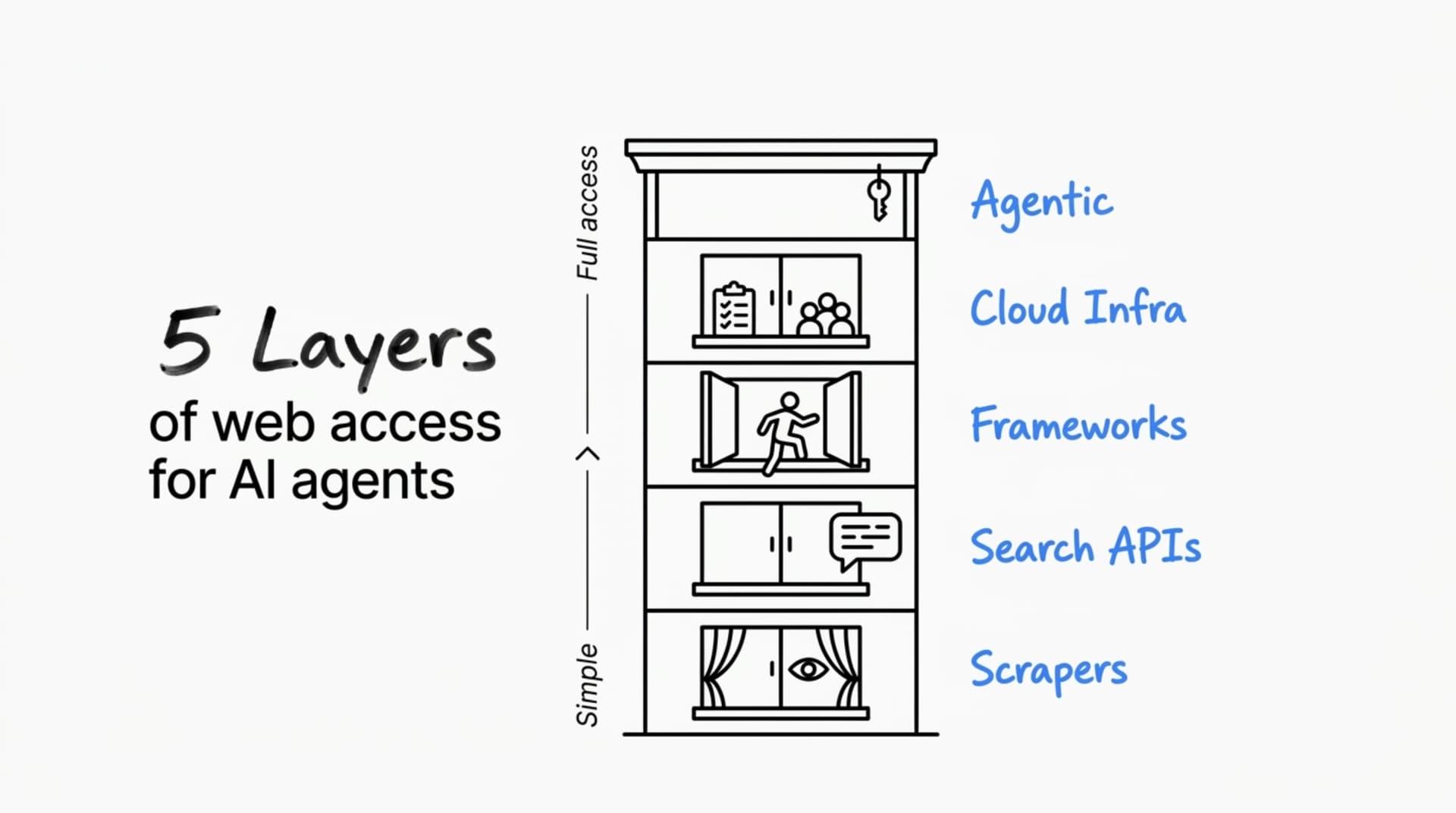
Imagine you need information from a building across the street. You could peer through the window. You could ask someone who's been inside. You could walk in and look around yourself. You could hire a team to manage operations inside. Or you could buy the whole building.
Each level of access costs more, does more, and introduces more moving parts. The most common mistake is walking into the building when peering through the window would have been enough.
Web access for AI agents follows the same pattern:
Each layer exists because someone hit a problem that the layer below couldn't solve. Understanding that progression, why each layer was created, and what gap it fills, is the fastest way to know which one you need.
Scrapers: When Your Agent Only Needs to Read
The simplest form of web access: point at a URL, get back clean content.
Why does this layer exist as something separate from browsers? Because opening a full browser to read a page is wildly expensive for what you're getting. A scraper fetches HTML, parses it, and returns structured text. No browser instance, no rendering engine, no GPU cycles spent on CSS animations nobody will see. It's faster by orders of magnitude and costs almost nothing to operate.
This is the right tool when your agent needs to consume web content without interacting with it. Pulling documentation pages into a RAG pipeline. Extracting product specs from known URLs. Feeding articles into a summarization workflow. The content loads in the HTML; there's nothing to click, no forms to fill, no login wall.
Four tools cover most use cases:
Firecrawl covers most scraping needs. It can crawl whole sites, not just single pages. It outputs markdown and structured data, captures screenshots, and has an extraction API that works with LLMs for more complex parsing. Most developer teams building RAG pipelines use it because it handles both single-page and multi-page crawls.
Firecrawl is moving beyond scraping. They launched the /agent endpoint in late 2025, which takes a natural-language prompt and returns structured data without requiring you to provide URLs. You just describe what you want: "Find YC W24 dev tool companies and get their contact info and team size." The agent searches the web, navigates multi-page flows, clicks through pagination, handles dynamic content, and returns typed JSON using Pydantic or Zod schemas.
I've used the /agent endpoint for research. About 80% of the time, it works well. It finds the data, navigates to the right pages, follows the steps, and returns clean, structured output. The other 20% of the time, it just stops partway through. No error, no partial results. If you need every job to finish, you'll want retry logic and fallback options. But for batch research where you can rerun the failures, getting 80% of tasks done automatically is genuinely useful.
Firecrawl also launched Browser Sandbox, which gives your agents a fully managed, isolated browser environment with Playwright and their Agent Browser pre-loaded. No local Chromium install, no configuration. It's their answer to the "what happens when scraping isn't enough" question, and it means Firecrawl is quietly becoming a full-stack web data platform rather than just a scraper.
Apify is the platform play. Founded in 2015, it's been doing web scraping longer than most AI companies have existed. The core concept is "Actors," serverless cloud programs that handle everything from simple page scrapes to complex multi-step automations. The Apify Store has over 3,000 pre-built Actors for specific sites and use cases. Need to scrape Google Maps results, pull LinkedIn profiles, or extract Amazon product data? Someone has probably already built and maintained an Actor for it.
Apify also built Crawlee, an open-source web scraping and browser automation library that supports Playwright, Puppeteer, and Cheerio crawlers. Think of it as the open-source engine underneath the platform. Where Firecrawl gives you a single API for most scraping needs, Apify gives you a marketplace and an infrastructure layer. You can use pre-built scrapers, customize them, or build your own and run them on Apify's cloud with built-in proxy management, scheduling, storage (datasets, key-value stores, request queues), and monitoring.
The trade-off is complexity. Firecrawl is "one API call, get data back." Apify is "here's a platform with dozens of capabilities and a marketplace of tools." If you need a specific scraper for a specific site and someone's already built the Actor, Apify saves you days. If you need a general-purpose scraping API that works with any URL, Firecrawl is simpler.
Jina Reader is the zero-configuration option. Prepend r.jina.ai/ to any URL and you get markdown back. No SDK, no authentication for basic use, no setup. When your agent needs a quick one-off page read inside a larger workflow, Jina's simplicity is hard to beat.
Crawl4AI is open source and built for teams that want full control. It supports parallel crawling, multiple output formats, and JavaScript execution for single-page apps. The trade-off against Firecrawl: more upfront configuration work, but no per-request pricing and complete control over the infrastructure.
Where scrapers stop working: They can't log in to anything. They can't click the "load more" buttons. They can't handle content that only appears after user interaction. If the data you need sits behind authentication, infinite scroll, or dynamic rendering that requires user input, you need the next layer up. (Though Firecrawl's /agent endpoint is blurring this line, since it can navigate and click through pages. The question is whether you need that capability for a known workflow you'll run repeatedly, or for one-off research tasks. For repeatable workflows, dedicated browser automation gives you more control.)
But before you reach for a browser, ask a different question first.
Recommended
The Race to Make Personal AI Work

I tried using the Instacart app in ChatGPT today. It didn’t really work. After spending more time on it than I wanted to, I gave up and did the shopping myself. I wanted it to work. Ordering groceries is exactly the kind…
Read nextSearch APIs: When Your Agent Doesn't Know Where to Look
Scrapers need a URL. Sometimes your agent doesn't have one. The task starts with a question, not an address: "find the latest pricing for AWS Bedrock" or "what are developers saying about the new React compiler?"
This is fundamentally different from scraping, and that's why search APIs exist as their own layer. Web search is a hard engineering problem. Google spent decades building its index and ranking engine. You can't replicate that by crawling the web yourself. You need access to a search engine's index, packaged in a format an LLM can work with.
Exa uses neural search, which means it finds relevant content even when the query doesn't match keywords. Ask for "tools for building AI agents that control browsers," and it finds pages that discuss the concept without using those exact words. Exa also returns full page content by default, not snippets. That means you often don't need a scraper as a second step; the search result already contains the full text.
Tavily is purpose-built for AI agents. It optimizes for single queries with enough context that the agent can act on the first response without follow-up searches. If Exa is a research library where you browse and read deeply, Tavily is the reference desk that hands you the one document you need.
Pairing layers: A research agent might use Exa to discover 5 relevant sources, then Firecrawl to extract structured data from each. The search API finds the right pages; the scraper reads them thoroughly. These two layers complement each other well.
But what if your agent needs to fill out a form? Navigate a multi-step checkout? Log in to a dashboard? Neither scrapers nor search APIs can do any of that. For interactions, you need an actual browser.
Browser Automation Frameworks: Where Most of the Complexity Lives
This is the layer that most people picture when they hear "AI browser automation," and it's the one with the most tools, the most architectural variation, and the most ways to spend money solving a problem you didn't need to solve.
Browser automation frameworks give your agent a real browser to control: clicking buttons, filling forms, scrolling through pages, and navigating multi-step workflows. The AI component makes this different from traditional Playwright or Selenium scripts. Instead of writing CSS selectors that break during redesigns, you describe what you want in natural language, and the model figures out how to execute it.
But to understand why the current tools look the way they do, you need to understand the problem they're all reacting to.
Why Traditional Browser Automation Breaks
When you write a Playwright test, you write selectors. page.locator('.checkout-btn') or page.getByRole('button', { name: 'Submit' }). Each selector is an address; it tells the browser exactly where to find the element you want.
Addresses break when things move.
If a developer renames the class from checkout-btn to btn-primary, your locator fails. If the button moves inside a different container, your XPath breaks. If the design team swaps a native <button> for a custom React component with a different DOM structure, your entire test suite needs updating.
This isn't a bug in Playwright. It's a structural consequence of how selector-based automation works: your scripts are coupled to someone else's implementation details. Every CSS class rename, every component refactor, every A/B test variant can cascade into broken automation.
The AI approach replaces addresses with descriptions. Instead of "find the element with class checkout-btn," you say "click the checkout button." The model looks at the page, understands what a checkout button is in context, and locates it regardless of its CSS class, DOM position, or element type.
That's the shift. From addressing elements by their location in the code to understanding elements by their meaning on the page. The same way you find the checkout button when you shop online, you don't inspect the DOM; you read the page.
Three Frameworks, Three Architectural Bets
The major tools in this space take fundamentally different approaches to the same problem. Understanding their architectural choices helps you pick the right one, because the architecture determines the cost structure, the failure modes, and how much control you retain.
Stagehand keeps Playwright's programming model and adds AI on top. Built by Browserbase, it gives you three natural-language primitives: act() (perform an action), extract() (pull data from the page), and observe() (look at the current page state). You still write code. You still have full access to Playwright's API for deterministic steps. The AI handles the parts where resilience to layout changes matters more than speed.
Why this hybrid approach? Because Stagehand's creators recognized that most browser workflow steps are predictable. You know which URL to visit. You know what page comes next. The AI needs to handle the 20% of interactions that break during redesigns, not the 80% that never change. By using Playwright for predictable steps and LLM calls only for uncertain ones, Stagehand keeps token costs manageable.
A technical note worth knowing: Stagehand v3 communicates directly with Chrome DevTools Protocol rather than going through Playwright's abstraction layer for AI-driven actions. That architectural choice reduced latency but narrowed cross-browser support. If you need Firefox or WebKit automation, standard Playwright still handles those; the AI primitives target Chrome/Chromium.
Browser Use takes the opposite bet. It's AI-first from the ground up. You describe a task in natural language, and the framework decides how to navigate, what to click, and how to handle each page. The agent makes an LLM call for nearly every browser interaction.
Browser Use has roughly 78,000 GitHub stars (this number changes constantly) and supports the widest range of models, including GPT-4o, Claude, Gemini, and local models via Ollama. Its standout feature is multi-page memory; agents accumulate context across page navigations. In a research workflow where information from page three informs what you do on page seven, this context persistence matters. Stagehand doesn't offer this natively.
The trade-off is cost. Every interaction is an LLM call. A complex multi-page workflow might require 15 to 20 model calls at GPT-4o pricing. The same workflow in Stagehand might need three or four AI calls, with Playwright handling the rest deterministically.
Playwright MCP is Microsoft's entry, and it's architecturally distinct from both. It's a Model Context Protocol server that lets any MCP-compatible AI agent (Claude, GitHub Copilot, custom agents) control a browser through structured accessibility snapshots.
Most AI browser tools send the model a screenshot and ask it to interpret the image visually. Playwright MCP sends a structured accessibility tree instead, the same data that screen readers use. This distinction matters in three ways: it's faster (no image processing), it's cheaper (text tokens cost less than vision tokens), and it's more reliable (structured data is unambiguous in ways screenshots aren't).
Setup is one command: npx @playwright/mcp init. Any MCP-compatible client automatically picks it up. If you're already building with MCP, and the ecosystem is moving in that direction quickly, Playwright MCP adds browser access without a new framework or dependency.
What I Found Running These Side by Side
I tested identical scenarios across Stagehand, Browser Use, and Skyvern (a cloud-based option) to stress-test specific claims.
On selector resilience: Both Stagehand and Browser Use handled moderate layout changes well. When I moved a button to a different DOM position, both found it through semantic understanding rather than CSS class matching. Where both struggled: element type changes. When a <button> became a clickable <div> with no accessible label, both tools had trouble. That's not an exotic edge case; it's exactly the kind of change a React component library migration produces.
On structured extraction: Stagehand's extract() method accepts a Zod schema and returns typed data. I pointed it at a financial dashboard with dynamic charts and asked for specific values by name. Four out of five runs returned correct data. The fifth returned a plausible-looking value that wasn't anywhere on the page.
That 80% accuracy rate is important to sit with. For batch research where you're aggregating across dozens of sources and can tolerate noise, it's workable. For anything that feeds into a financial system, a purchase decision, or a customer-facing workflow without a human verification step, it's a liability.
The failure nobody talks about: When a traditional Playwright script can't find an element, it throws an exception. You know it broke. You get a stack trace. You fix it.
AI agents don't fail that way.
When extraction hallucinates, it returns a clean, well-typed object that contains incorrect data. No error, no warning, no indication that anything went sideways.
This silent failure mode is the single most important difference between AI and traditional browser automation. Most comparison articles skip right past it, and that's exactly the kind of thing that causes real damage in production.
Framework Comparison
| Capability | Playwright | Stagehand | Browser Use | Skyvern |
|---|---|---|---|---|
| Natural language control | No | Yes | Yes | Yes |
| Code-level control | Full | Full (Playwright underneath) | Limited | No |
| Selector resilience | Low (address-based) | High (semantic) | High (semantic) | Very high (vision + semantic) |
| Multi-page memory | Manual only | Not built-in | Yes | Yes |
| Structured extraction | Manual parsing | Zod schema (typed) | LLM-driven | LLM + vision |
| CAPTCHA handling | No | Cloud only | Third-party | Some built-in |
| Multi-LLM support | N/A | OpenAI, Anthropic | OpenAI, Claude, Gemini, local | OpenAI, Anthropic |
| Cost per action | Compute only | Medium (selective LLM calls) | High (every action calls an LLM) | Highest |
| Best for | Deterministic testing | Hybrid workflows | AI-first research | Fully managed automation |
Pay attention to the "Cost per action" row. The architectural difference between Stagehand and Browser Use shows up directly on your invoice. Stagehand calls the LLM only when it encounters uncertainty; Playwright handles the rest. Browser Use calls the LLM for everything. At 100 runs per day, that difference might be negligible. At 10,000, it defines your infrastructure budget.
Which Framework Fits Your Team
TypeScript teams that want resilience without losing control: Stagehand. You keep Playwright's programming model for predictable steps and use act() for the parts that break during redesigns. The lowest LLM cost of the three.
Python teams building research workflows with multi-page context: Browser Use. The multi-page memory feature gives you something the others don't have natively. Budget for the token costs and validate extraction results.
Teams already building with MCP-compatible agents: Playwright MCP. Lightweight, no new framework to learn, and the accessibility-tree approach avoids the cost of vision-model token pricing.
Cloud Browser Infrastructure: When Running Your Own Browsers Stops Scaling
Running browser instances on your own machine works for prototyping and low-volume automation. It stops working when you need 50 concurrent sessions, session-level debugging with video replay, residential proxies to avoid bot detection, or CAPTCHA solving that doesn't require manual intervention.
Cloud browser infrastructure exists because managing a fleet of headless browser instances is infrastructure engineering, and most teams building AI agents don't want that to become their core competency. It's the same logic that moved web servers from closets to cloud hosting.
Browserbase is the most established platform, valued at approximately $300M. They provide cloud browser sessions compatible with Playwright, Puppeteer, and Selenium, with Perplexity and Vercel among their public customers. Browserbase also built Stagehand as their open source framework; a vertical integration worth noticing. The company that operates the infrastructure builds the open source tool that feeds into it. That means tight integration between Stagehand and Browserbase, which is convenient. It also means Stagehand's roadmap is shaped by what drives Browserbase subscriptions.
Browser Use Cloud is the interesting new entry here, and it's worth understanding why it sits in this section rather than the framework section above. Browser Use started as an open-source AI browser automation framework. Browser Use Cloud bundles that framework with fully managed infrastructure: stealth browsers with anti-fingerprinting, automatic CAPTCHA solving, Cloudflare bypass, cookie and ad blocking, and residential proxies in 195+ countries. All of that is on by default. You don't configure any of it.
What makes Browser Use Cloud distinct from Browserbase is that it includes the AI agent as a built-in primitive. With Browserbase, you get cloud browsers and connect your own framework (Stagehand, Playwright, whatever). With Browser Use Cloud, you get cloud browsers and the AI agent in one service. Describe a task in plain text, and get structured data back. Or drop down to raw CDP access and connect Playwright, Puppeteer, or Selenium directly if you need code-level control.
Two features stand out. First, 1Password integration: you can pass a vault ID, and the agent auto-fills credentials and handles 2FA codes during authenticated workflows. That solves the credential management problem that every other platform leaves to you. Second, browser profiles with persistent state: saved cookies and localStorage carry across sessions, so agents can pick up authenticated workflows without re-logging in every time.
The trade-off is vendor lock-in. Browserbase is infrastructure-only; you can swap out the framework at any time. Browser Use Cloud is a framework-plus-infrastructure offering; you're buying the whole stack. If Browser Use's agent model works for your use case, the integrated experience is hard to beat. If you want to run Stagehand or your own automation code on managed browsers, Browserbase or Hyperbrowser gives you that flexibility.
Hyperbrowser takes the same API-first approach as Browserbase but adds a broader agent integration layer. Where Browserbase gives you raw CDP sessions and lets you bring your own framework, Hyperbrowser bundles first-class support for Browser Use, Claude Computer Use, OpenAI CUA, Gemini, and their own open-source HyperAgent — all callable through one SDK. You also get built-in scrape, crawl, and extract endpoints (similar to Firecrawl's APIs) alongside the raw browser sessions, which means you can mix traditional scraping and agent-driven workflows without juggling separate services. Pricing runs on a credit system ($0.10 per browser hour, proxy data billed separately), with sub-second cold starts from pre-warmed containers and support for 10,000+ concurrent sessions.
Notte (YC-backed, SOC 2 Type II) brings browser sessions, agents, and serverless deployment together in one platform. Two features set it apart. First, Persona Identities: Notte gives each agent a real email inbox and SMS phone number. This lets your automation create accounts, get verification emails, handle OTP codes, and finish 2FA steps without anyone stepping in. No other platform here does that. Second, their vault system is built on open-source Infisical and uses a zero-trust approach. Credentials never go to the LLM. The vault fills in real credentials at the browser level after the model decides what to use, so the model only sees placeholders. Notte also offers Browser Functions, which let you deploy automation scripts as serverless API endpoints right next to the browser. This means no network hop, plus cron scheduling and versioning. Pricing starts at $0.05 per browser hour, which is about half what most competitors charge.
When to make the jump: Move to managed infrastructure when at least two of these are true: you need sustained concurrency across sessions; you need session recording for debugging production failures; proxy management has become an engineering burden; or your reliability requirements are tied to business SLAs. If only one of those applies, you can probably keep running browsers locally for a while longer.
Agentic Browsers: Where the Layers Start Converging
Fellou, Opera Neon, Perplexity Comet. These are end-user products with AI built into the browser itself. They're not developer tools today, and this post won't cover them in depth.
But they point to a shift. The line between tools for developers and products for users is getting less clear. Soon, your browser and your automation agent could be one and the same. For now, this is a product trend, not something developers choose directly.
Where AI Browser Automation Fails (and Why Most Articles Won't Tell You)
Benchmark numbers for AI browser automation look good. Tests like WebArena and VisualWebBench show 80-90% accuracy. But these benchmarks use controlled sites with predictable layouts. Real-world automation runs into the tricky cases that benchmarks leave out.
Four failure modes deserve more attention than they get.
Extraction hallucination is the biggest practical risk. If a Playwright script can't find an element, it fails. If an AI extraction agent can't find the data, it often just makes something up. You ask for a price, and it gives you a number. The number looks fine. It passes your schema checks. But it's not right.
Treat AI-generated data like user input: assume it might be wrong and check it before using it. Use schema checks, range validation, or run a second extraction to compare results. This isn't extra work. It's just part of using AI extraction in production.
Prompt injection from web content is a risk many automation builders miss. If your agent reads a page and acts on what it finds, a malicious site can steer those actions. Hidden HTML instructions, invisible text, or tricky content can push the agent to do the wrong thing. If your workflow reads untrusted pages and then makes purchases, submits forms, or sends data, your security model needs to cover this.
Non-determinism in CI/CD is the operational headache. Traditional browser tests are deterministic; same input, same output, same failure. AI-driven tests can produce different results on identical pages across runs because the model interprets elements slightly differently each time. Reproducing failures requires logging the full agent state (model version, prompt, page snapshot), not just the assertion that broke.
Cost surprises at scale catch teams that base estimates on small tests. Several groups using Browser Use at scale have seen bigger API bills than expected because they didn't account for how many tokens each session uses. This is how the pricing works. Before you go all-in on an AI-first setup, run the numbers for your actual usage.
How to Choose Without Overbuilding
The decision starts with one question: Does your agent need to read, find, or interact?
| Your agent needs to... | Start with... | Why |
|---|---|---|
| Read content from known URLs | Firecrawl, Jina Reader, Crawl4AI, or Apify | Fast, cheap, no browser overhead |
| Gather data from complex or unknown sites | Firecrawl /agent or Apify Actors | Agentic scraping without managing browsers |
| Find relevant content by query | Exa or Tavily | You need a search index, not a scraper |
| Click, type, and navigate web pages | Stagehand, Browser Use, or Playwright MCP | You need a real browser with AI resilience |
| Run web interactions at production scale | Browserbase, Browser Use Cloud, or Hyperbrowser | You need managed browser infrastructure |
Most real agents combine two or more layers. A research agent might use Exa to find sources, Firecrawl to extract content from each source, and Browser Use to handle the one site that requires authentication. The key is to reach for the lightest layer that gets the work done, then add complexity only when the lighter layer can't handle it.
Starter Stacks by Use Case
Research assistant: Exa or Tavily for source discovery. Firecrawl or Jina Reader for content extraction. For complex multi-site research where you don't want to manage individual scrapers, Firecrawl's /agent endpoint or an Apify Actor can handle the navigation autonomously. Browser Use as a fallback for interactive or paywalled content.
Back-office workflow agent: Stagehand or Browser Use for web form interactions and multi-step processes. If you need credential management and stealth built in, Browser Use Cloud bundles both. Add a standalone managed infrastructure (Browserbase, Hyperbrowser) only when you need to run your own automation code at scale.
SEO and market monitoring pipeline: Search API for fresh source discovery. Scraper for structured data extraction. Apify is strong here because of the pre-built Actor marketplace; someone has likely already built and maintained a scraper for the specific sites you're monitoring. Browser automation only for pages that require JavaScript rendering or authentication to access.
A Step-by-Step Approach That Won't Surprise You
Week 1: Start with a single use case. Decide if it's about reading, finding, or interacting. Build the simplest working version using the right layer. Track just one thing: extraction accuracy for reads, source relevance for finds, or task completion rate for interactions. Hold off on cloud infrastructure for now.
Weeks 2-3: Add retry logic, set timeouts, and sort out error types. For interaction steps, determine which can be handled by tools like Playwright and which require AI to handle the unexpected. Add logging so anyone on your team can read and debug it. If you can't explain a failure right away, it's not ready for production.
Week 4 and after: Consider managed browser infrastructure if you need to run many sessions at once, need session replay for debugging, find that proxy management is taking too much time, or reliability is now a must-have for the business.
Back to the Checkout Page
The developer who spent three days fixing broken Playwright selectors could have skipped all that with Stagehand. A UI redesign that broke every CSS locator wouldn't have mattered to act('click the checkout button'). The model looks for meaning, not addresses, and the meaning stayed the same.
But there's a trade-off. You stop maintaining selectors, but now you have to check the outputs. Instead of a stack trace showing the broken locator, you're checking if the agent pulled the right confirmation number or something close enough to pass your checks.
That's the main trade-off with AI browser automation. You trade fixing selectors for checking outputs. You get less breakage from UI changes, but sometimes the results are off and need a closer look.
For most teams, output validation is cheaper than selector maintenance. But go in knowing what you're buying and what you're giving up. And start with the lightest layer that solves your problem; you can always move up.
Need help deciding?
We track 38+ browser automation tools on EveryDev.ai with reviews, pricing, and feature breakdowns. If you want to put specific tools head-to-head, our compare feature lets you stack Browser Use, Browserbase, Hyperbrowser, and Notte side by side — pricing tiers, supported frameworks, concurrency limits, and security models in one view. You can swap in any tool from the directory to build your own comparison.
Comments
Checking profile…