AionUi
A free, open-source desktop cowork platform that lets you run, coordinate, and automate 20+ AI agents (Claude Code, Codex, Gemini CLI, and more) in a unified workspace on your own machine.
At a Glance
Completely free and open-source under Apache-2.0. Users only pay for their chosen AI provider's API usage.
Engagement
Available On
Alternatives
Listed Aug 2026
About AionUi
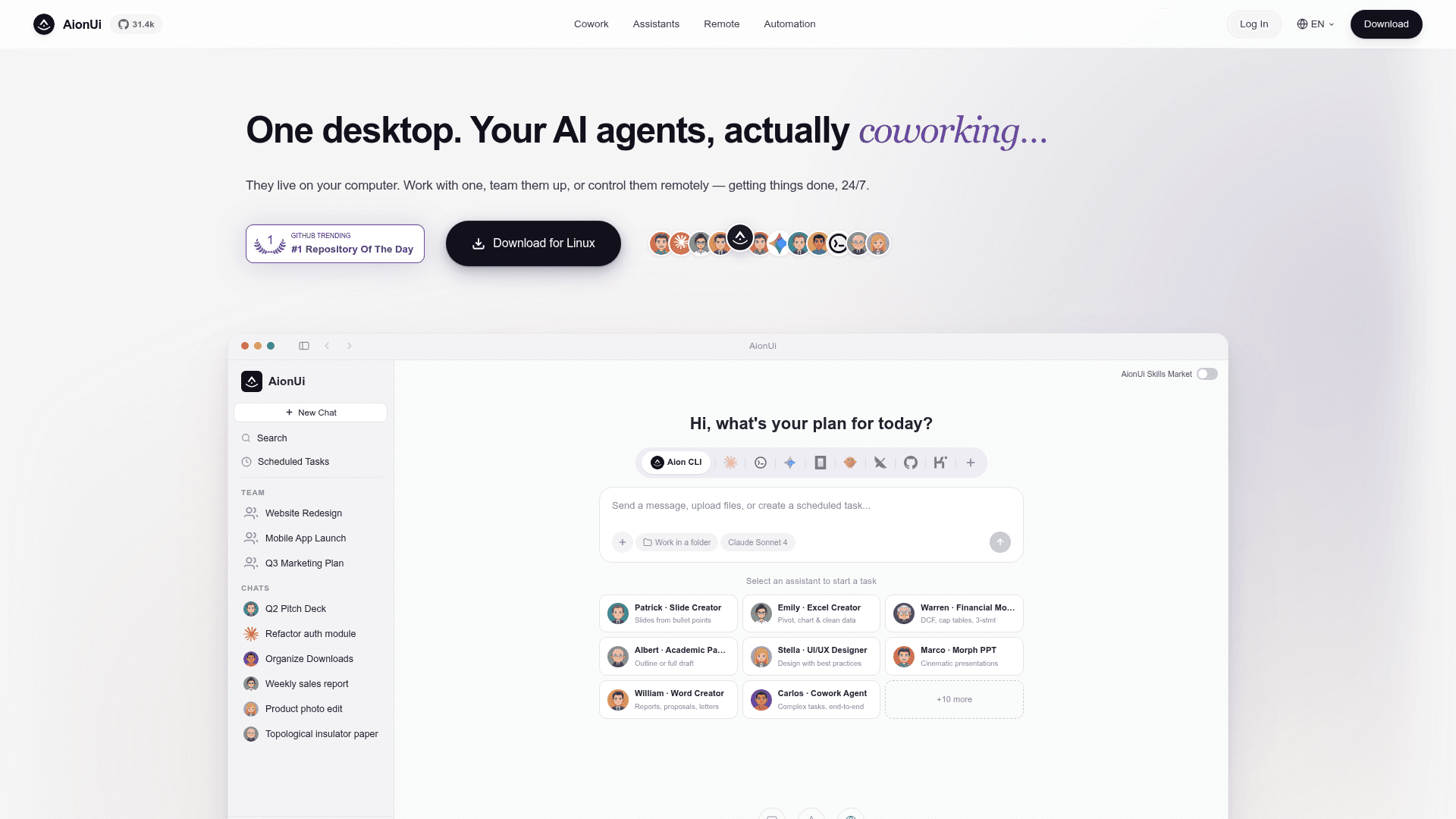
AionUi is a free, open-source desktop application licensed under Apache-2.0 that turns your computer into a shared workspace for AI agents. Built by the iOfficeAI organization and maintained by a large contributor community, it auto-detects CLI agents you already have installed — Claude Code, Codex, Gemini CLI, Goose, OpenClaw, and 20+ more — and lets you run them in parallel through a single unified interface. All data is stored locally in a SQLite database; nothing is routed through AionUi's servers.
What It Is
AionUi is a multi-agent cowork platform for the desktop. Unlike single-model chat clients, it acts as a coordination layer that can run multiple AI agents simultaneously, assign tasks to the right agent, and let them collaborate on complex work. It ships with 21 built-in professional assistants covering presentations, spreadsheets, documents, academic writing, financial modeling, UI/UX design, and more — all ready to use without any additional setup beyond entering an API key. The platform supports 30+ AI providers including Gemini, Anthropic, OpenAI, AWS Bedrock, Ollama, LM Studio, and a range of Chinese platforms.
Multi-Agent Architecture and Team Mode
AionUi's core differentiator is its multi-agent coordination layer, called ACP (Agent Communication Protocol). In Team Mode, a Leader agent receives a high-level instruction, breaks it into subtasks, and delegates to Teammate agents running in parallel. Teammates share a workspace folder, communicate through an async mailbox, and write results to a shared task board. Supported leader and teammate backends include Claude Code, Codex, Gemini, Snow CLI, and Aion CLI (aionrs, the Rust-based backend service shipped with AionUi). The platform also offers a unified MCP (Model Context Protocol) configuration — add MCP servers once and they automatically sync to every connected agent.
Built-in Office Toolkit and File Generation
AionUi ships with a native office file generation engine powered by its companion project OfficeCLI. Agents can produce editable .pptx (including Morph-animated transitions), .docx, .xlsx, .xlsm, .csv, and .pdf files directly on the user's machine — no cloud upload or third-party service required. The built-in preview panel supports 10+ formats including PDF, Word, Excel, PowerPoint, Markdown, HTML, images, code files, and diff patches, with real-time tracking and Git-based version history.
Remote Access and 24/7 Automation
Users can send commands to their agents from anywhere via a built-in WebUI (accessible by browser over LAN or cross-network), Telegram, Lark (Feishu), DingTalk, WeChat, Slack, or Discord. Scheduled tasks run on a cron system with three modes: standard cron expressions with timezone support, fixed intervals, and one-time triggers. Tasks can continue in an existing conversation (preserving context) or open a fresh session on each trigger. AionUi automatically prevents system sleep while tasks are active and detects missed triggers after wake.
Platform and Extensibility
AionUi runs on macOS 10.15+, Windows 10+, and Linux (Ubuntu 18.04+, Debian 10+, Fedora 32+), requiring 4 GB RAM and 500 MB storage. It can also be installed on macOS via Homebrew. The assistant system is extensible through a three-tier skill architecture: built-in skills (shipped with the app, including pptx, docx, pdf, xlsx, mermaid), custom skills (user-defined markdown files in the skills/ directory), and extension skills (contributed via the Extension SDK). Users can also create entirely custom assistants by writing markdown definition files.
Update: v2.1.46
The latest release is v2.1.46, published on 2026-08-03, reflecting active and frequent development. The GitHub repository shows the project was created in August 2025 and has received continuous pushes, with the repository accumulating over 31,000 stars and 3,100 forks according to GitHub metadata. The project has been featured on GitHub Trending and has an active partnership with Kimi (Moonshot AI) offering contributor bonuses. The README is available in 10 languages, signaling broad international adoption intent.
Community Discussions
Be the first to start a conversation about AionUi
Share your experience with AionUi, ask questions, or help others learn from your insights.
Pricing
Open Source
Completely free and open-source under Apache-2.0. Users only pay for their chosen AI provider's API usage.
- All built-in features included
- 21 professional assistants
- Multi-agent cowork
- 30+ AI provider support
- Scheduled task automation
Capabilities
Key Features
- Multi-agent cowork with 20+ CLI agents (Claude Code, Codex, Gemini CLI, Goose, OpenClaw, etc.)
- 21 built-in professional assistants (PPT Creator, Excel Creator, Word Creator, Academic Paper, Financial Model, UI/UX Designer, etc.)
- Team Mode with Leader/Teammate agent orchestration via ACP
- Unified MCP (Model Context Protocol) configuration synced to all agents
- Native office file generation: PPTX (with Morph transitions), DOCX, XLSX, PDF
- Built-in preview panel for 10+ formats with Git-based version history
- Remote access via WebUI, Telegram, Lark, DingTalk, WeChat, Slack, Discord
- 24/7 scheduled task automation with cron, interval, and one-time triggers
- Support for 30+ AI providers including Gemini, Claude, OpenAI, AWS Bedrock, Ollama, LM Studio
- YOLO/Full-Auto mode for unattended agent execution
- Three-tier extensible skill system (built-in, custom, extension)
- Custom assistant creation via markdown definition files
- Multi-task parallel processing with independent conversation contexts
- AI image generation and editing (Gemini-powered)
- Smart file management: batch rename, auto-organize, classify
- CSS interface customization
- Local SQLite data storage — no server upload
- Cross-platform: macOS, Windows, Linux
- Homebrew installation support for macOS
- Skills Marketplace for community-contributed skills
Integrations
Demo Video