
c9watch
A macOS desktop dashboard and JSON CLI that monitors every Claude Code, Codex, Cursor Agent and Pi session running on your machine.
At a Glance
Free and open-source (MIT) macOS app and CLI for monitoring Claude Code, Codex, Cursor Agent and Pi sessions.
Engagement
Available On
Listed Oct 2026
About c9watch
c9watch is an open-source (MIT) macOS app and JSON CLI by Min-Chen Lee (minchenlee) that shows every Claude Code, Codex, Cursor Agent and Pi session on a machine in one dashboard. It finds sessions by scanning running processes, so agents can be started from any terminal or IDE. The latest release listed is v0.11.1.
What It Is
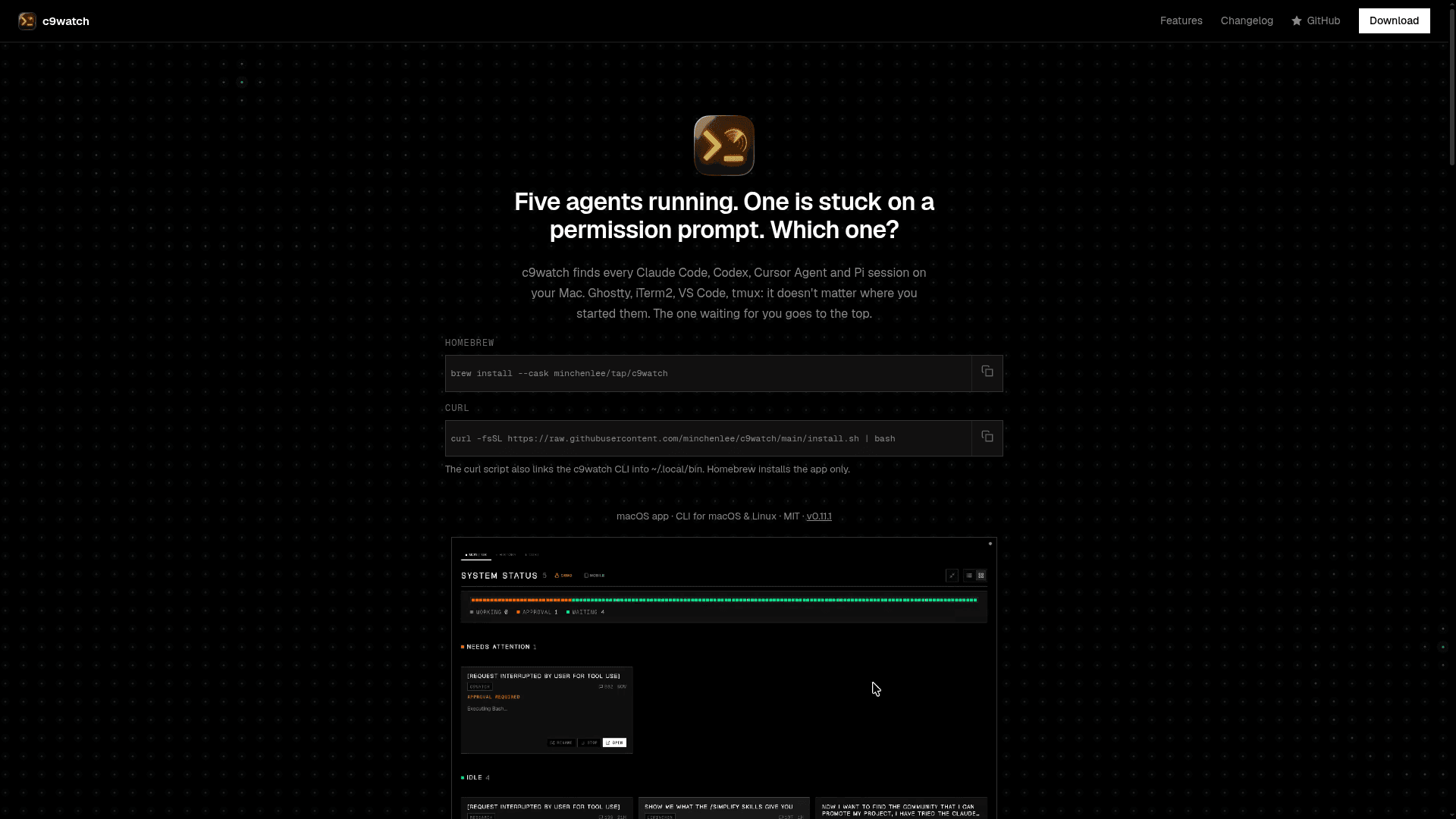
c9watch is a session monitor for AI coding agents. A desktop dashboard is for the developer, and a CLI that outputs JSON is for other agents and scripts. Both use the same detection engine. Sessions are shown as Working, Needs Attention or Ready, and sessions waiting on the user are sorted to the top. Each card shows the model name, project path, git branch, current tool and elapsed time.
How Detection and Monitoring Work
A background thread polls every 2 seconds using the sysinfo crate. Claude Code processes are matched to session files in ~/.claude/projects/, and Codex, Cursor Agent and Pi sessions are read from their own session files. No plugins are needed. The README describes Claude Code and Codex as fully monitored, Cursor Agent as monitor-only, Pi as read-only, and OpenCode as a preview that needs a manual server connection. On macOS, Full Disk Access is needed to read agent process working directories.
Dashboard Tools
The app includes a conversation viewer, session history with metadata filtering and deep content search, and a cost tracker with daily, per-project and per-model views. It also has a menu bar tray popover, native status notifications, a memory file viewer, and a token distance visualizer that exports a shareable PNG. A built-in WebSocket server lets a phone or browser on the same network view a live dashboard via QR code.
CLI for Agents
The same binary provides commands such as list, status, view, history, search, self, stop, watch, wait, tasks and cost. Output is JSON for piping into jq or consumption by other coding agents. A Claude Code skill is included so Claude Code can discover and use the CLI. The CLI installs on macOS and Linux, while the desktop app is for macOS. PM orchestration commands are disabled by default and require a build feature flag.
Setup Path
Install the app with Homebrew or an install script that also links the CLI, download a .dmg from GitHub Releases, or build from source with Rust, Node.js and the Tauri CLI. The app is built with Tauri 2, Rust and Svelte rather than Electron. The project states it was built mostly with AI coding agents, with a human directing, testing and reviewing.
Community Discussions
Be the first to start a conversation about c9watch
Share your experience with c9watch, ask questions, or help others learn from your insights.
Pricing
Open Source
Free and open-source (MIT) macOS app and CLI for monitoring Claude Code, Codex, Cursor Agent and Pi sessions.
- macOS desktop app
- CLI for macOS & Linux
- MIT license
- Auto-discovery of agent sessions
- Cost tracker
Capabilities
Key Features
- Automatic discovery of Claude Code, Codex, Cursor Agent and Pi sessions
- Real-time status: Working, Needs Attention, Ready
- Works with any terminal or IDE without plugins
- Conversation viewer with markdown and code blocks
- Session history with metadata filter and deep content search
- Cost tracker by day, project and model
- Menu bar tray popover
- Native macOS status notifications
- Mobile/web client via WebSocket and QR code
- Memory file viewer
- Token distance visualizer with PNG export
- JSON CLI for agents (list, view, search, watch, wait, stop, cost)
- Bundled Claude Code skill for the CLI
- Session control: stop, open parent terminal, rename, resume
- Debug console for detection diagnostics