Cabinet
Cabinet is a self-hosted AI workspace that unifies your company knowledge base with a team of AI agents that research, draft, and execute scheduled tasks 24/7.
At a Glance
About Cabinet
Cabinet is a self-hosted AI workspace built for teams that want to run AI agents on their own infrastructure, using their own model accounts. It combines a file-based knowledge base (Markdown on disk), a team of configurable AI agents, and deep integrations with the tools companies already use — all without vendor lock-in or a proprietary database. The product is available as a free self-hosted download for Mac and Windows, with managed cloud hosting on a waitlist.
What It Is
Cabinet positions itself as an "AI-first startup OS" — a single environment where a company's knowledge base, AI agent team, task management, and internal chat live together. Unlike chat-based AI tools that answer questions on demand, Cabinet runs agents on a cron-based schedule, so work like morning briefings, competitor scans, inbox triage, and pipeline digests happen automatically while teams sleep. Everything is stored as plain Markdown files in a folder the company owns, version-controlled by git, and portable without any export process.
File-Based Architecture and Ownership Model
Cabinet's core design principle is that company knowledge should live as files on disk, not rows in a vendor's database. Key architectural choices include:
- Markdown on disk: All pages, OKRs, decisions, and meeting notes are plain text files — greppable, git-trackable, and moveable without an export request.
- Git-backed history: Every save auto-commits, enabling full diff viewing and point-in-time restore for any page.
- No proprietary index: Humans and AI agents read the same files; nothing is hidden in a vector database.
- Bring Your Own AI (BYOAI): Cabinet connects to model accounts the organization already holds — Claude, OpenAI/GPT, Gemini, Grok, Copilot, Cursor, opencode, Pi, and local models — with no markup on inference costs.
AI Agent Team and Scheduled Automation
Cabinet's agents are not one-off chatbots. Each agent has goals, skills, and scheduled jobs. Teams can onboard role-specific agents (CEO, Editor, Marketer, SDR, Researcher) and assign them missions broken into tasks tracked on Kanban boards. Scheduled jobs use cron syntax — for example, a Reddit scout running every six hours or a weekly report every Monday. The enterprise page describes an always-on "Chief of Staff" agent that drafts a morning brief by 06:00 every weekday, grounded in OKRs, one-on-ones, and live data sources. Every dispatched task waits in a human approval queue before acting on anything external.
Integrations and Knowledge Connectors
Cabinet connects to a wide range of enterprise tools to pull scattered work into one navigable directory:
- Productivity & docs: Google Drive, OneDrive, SharePoint, Notion, Confluence, Dropbox, Box
- Communication: Slack, Gmail, Microsoft Teams, Google Meet, Zoom
- CRM & sales: Salesforce, HubSpot, Gong, Zendesk, Intercom
- Engineering: GitHub, GitLab, Jira, Linear, Datadog
- Data & analytics: BigQuery, Snowflake, Databricks, Looker, Tableau, Mixpanel, Amplitude
- HR & finance: Workday, BambooHR, Greenhouse, QuickBooks, Brex, Stripe, DocuSign
Enterprise and Security Posture
Cabinet's security page highlights self-hosting as the default deployment model, meaning company knowledge stays inside the organization's own environment and policies. Additional enterprise-track features include SSO with SAML/OIDC, SCIM provisioning, audit logs, git history for all changes, data residency control, and a SOC 2 Type II certification described as in progress. The enterprise page notes Fortune 500 pilots running in Q2 2026 and positions Cabinet against Workboard (closed database, six-figure contracts) and Microsoft Viva Goals (retired December 2024).
Update: Cabinet v0.6.0
The GitHub releases repository shows Cabinet v0.6.0 published on August 25, 2026, as the latest release. The repository (cabinetai/cabinet-releases) was created the same day, indicating this is an early public release milestone. Downloads are available as a Mac ARM64 DMG and a Windows EXE installer, with Linux described as coming soon. A CabinetCloud managed hosting option is on a waitlist, with the first 500 early supporters noted for priority access.
Community Discussions
Be the first to start a conversation about Cabinet
Share your experience with Cabinet, ask questions, or help others learn from your insights.
Pricing
Self-Hosted
Run the complete Cabinet product on your own machines. Free forever.
- Free to run on your own machines
- Bring your own AI accounts
- The complete Cabinet product
- Community support on Discord
Cabinet Cloud Pro
Managed hosting for one always-on Cabinet.
- Access across phone, laptop, and browser
- Agents can keep scheduled work moving
- Daily backups with 7-day retention
- Automatic updates
- Bring your own AI or add Cabinet AI
Cabinet Cloud Max
More capacity, hardened backups, and faster support.
- Everything in Cloud Pro
- Larger container for longer agent runs
- Encrypted backups with 30-day retention
- Point-in-time restore
- Custom domain
- Chat support under one hour during business hours
- Region pinning
Enterprise
For teams and regulated industries.
- Everything in Cloud Max
- Shared workspaces in early access
- Dedicated infrastructure and data residency
- SSO with SAML or OIDC
- 99.9% SLA
- Security review material and SOC 2 readiness plan
- Dedicated Slack channel
Cabinet AI+
Add Cabinet-managed AI access if you don't have your own model accounts.
Capabilities
Key Features
- File-based knowledge base (Markdown on disk)
- Git-backed version history with diff viewer and point-in-time restore
- AI agents with goals, skills, and cron-based scheduled jobs
- Bring Your Own AI (Claude, GPT, Gemini, Grok, local models)
- Human approval queue before agents act externally
- WYSIWYG + Markdown editor with Tiptap
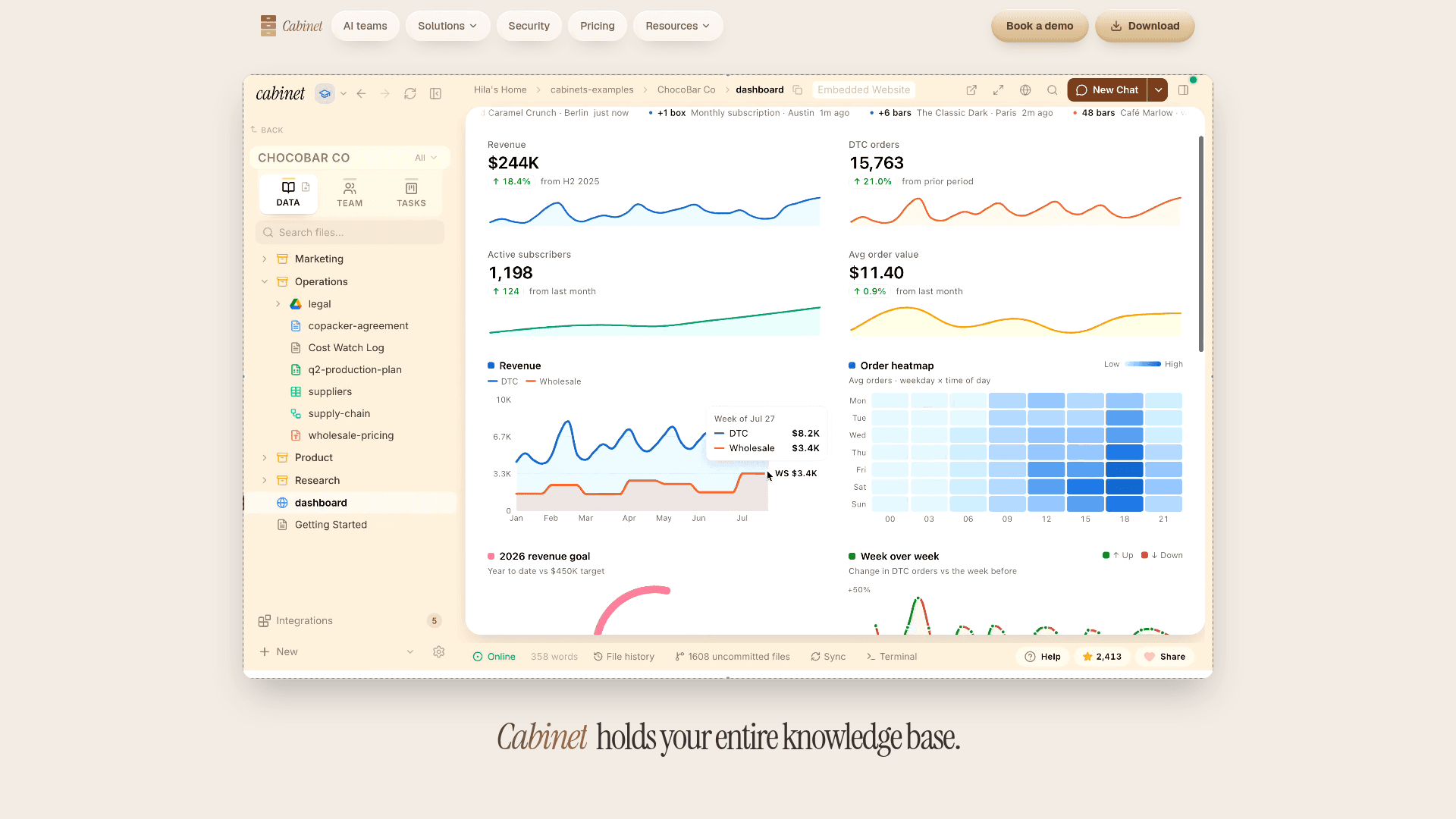
- Embedded HTML apps rendered as iframes
- Web terminal (xterm.js + node-pty)
- Full-text search with Cmd+K (FlexSearch)
- PDF and CSV first-class rendering
- Linked Git repos for codebase-aware agents
- Missions and Tasks with Kanban boards
- Internal team chat with @mention agent triggers
- Scheduled jobs (cron-based automation)
- Live dashboards and embedded apps
- Self-hosted deployment
- SSO with SAML/OIDC (enterprise)
- SCIM provisioning (enterprise)
- Audit log and git history
- Data residency control
- SOC 2 Type II (in progress)
- Plug-and-play AI team templates
- CabinetCloud managed hosting (waitlist)
Integrations
Demo Video