
CodeNomad
Desktop and browser workspace for OpenCode V2 that manages many agent sessions across projects, long conversations and Git worktrees.
At a Glance
CodeNomad desktop and browser workspace for OpenCode, released under the MIT License. Free to use, copy, modify and distribute.
Engagement
Available On
Alternatives
Listed Nov 2026
About CodeNomad
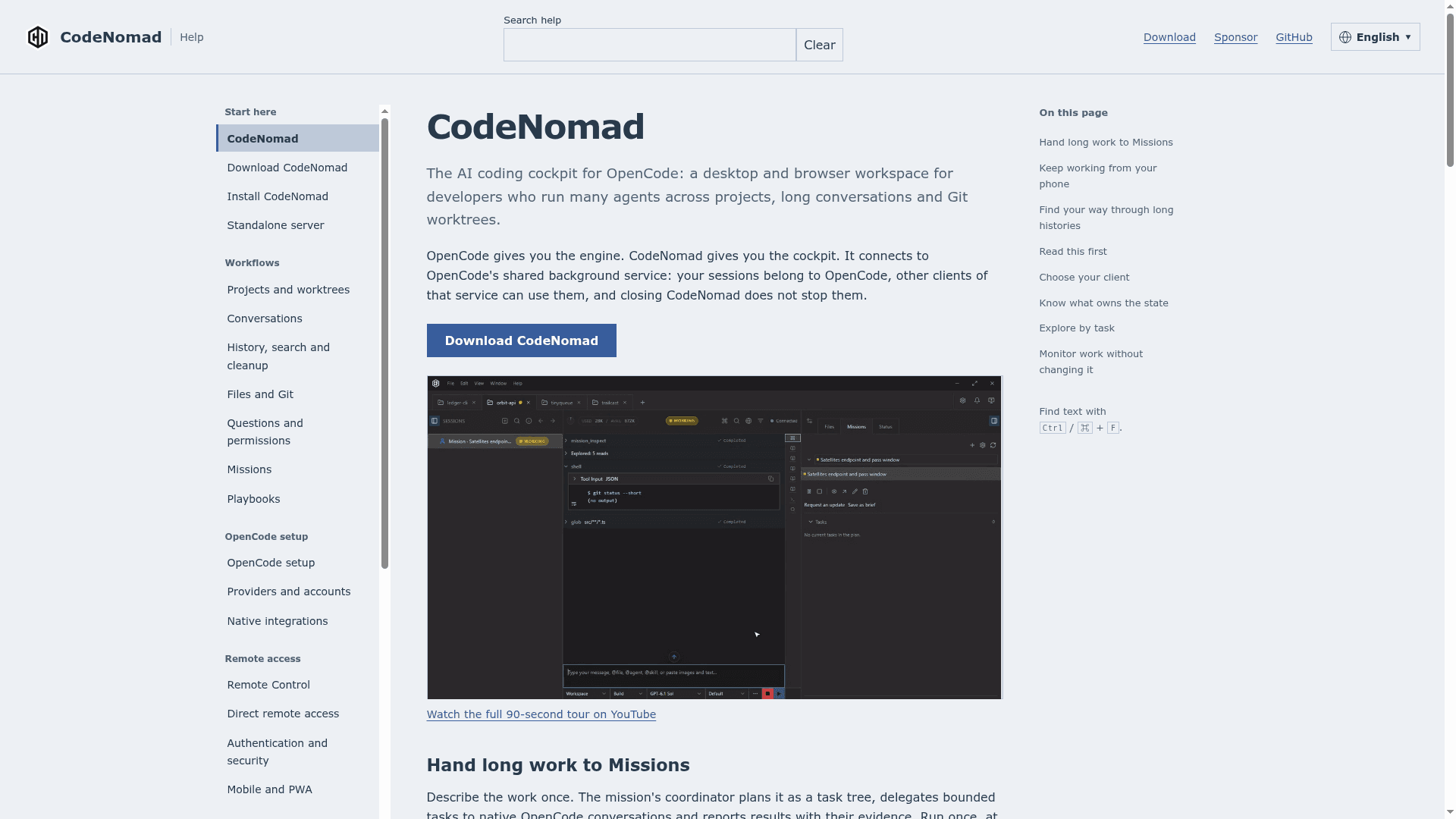
CodeNomad is an open-source desktop and browser workspace for OpenCode V2, developed by Neural Nomads. It connects to OpenCode's shared background service so that sessions stay available from CodeNomad and compatible terminal clients. The project describes itself as the cockpit for OpenCode's engine, aimed at developers who run many agents across projects, long conversations and Git worktrees.
What It Is
CodeNomad is a client workspace layered on top of OpenCode V2. Sessions and messages belong to OpenCode, while project tabs, composer drafts and layout belong to CodeNomad. Closing a CodeNomad tab, window or backend leaves the OpenCode service running. It ships as Electron and Tauri desktop builds for macOS, Windows and Linux, and as an npm-launched server that is used through a browser.
Working with Projects and Conversations
Users open project folders, pick the agent, model and thinking controls, and run conversations with Markdown, code, diffs and tool-result images. Nested sessions can be forked, and search reaches beyond loaded messages, with a timeline for jumping through long histories. Git worktrees can be created and selected, a session can be moved with its subsessions, and Git changes can be reviewed in the workspace. Files can be attached or referenced with @ mentions, and native questions and permissions from the agent are answered in the interface.
Missions and Playbooks
A Mission lets a user describe long work once. A coordinator plans it as a task tree, delegates bounded tasks to native OpenCode conversations and reports results with evidence. Missions can run once, on a schedule, or after a verified project change, and creation saves a paused Mission awaiting explicit start. Playbooks cover debugging, product delivery and comparing two models with a blind judge.
Remote Access and Previews
A CodeNomad server can be reached from a desktop client or browser with password authentication and HTTPS. Remote Control pairs a phone, tablet or another computer through a one-use link or QR code via an OpenTunnel relay without opening inbound ports; projects, credentials and agent execution stay on the host. SideCars open web tools such as OpenVSCode Server or a ttyd terminal as tabs, and agents can open visible browser previews in Electron or Windows Tauri. Voice dictation and response playback are also documented.
Requirements and Setup
CodeNomad 1.0.0 requires OpenCode V2 (2.2.3 minimum, 2.2.5 recommended). Git must be available to the backend for repository and worktree features; without it the app falls back to a directory-only mode. Desktop builds bundle Node, while the standalone server needs Node.js, with 24 LTS recommended.
Community Discussions
Be the first to start a conversation about CodeNomad
Share your experience with CodeNomad, ask questions, or help others learn from your insights.
Pricing
Open Source (MIT)
CodeNomad desktop and browser workspace for OpenCode, released under the MIT License. Free to use, copy, modify and distribute.
- MIT License
- Desktop app (Electron and Tauri builds)
- Standalone server with browser access
- Remote Control and remote access
- Missions and Playbooks
Capabilities
Key Features
- Multiple project tabs with per-window drafts and view restoration
- Nested sessions, forking and full-history search with timeline
- Git worktree creation, selection and session moves
- Git change review in the workspace
- Missions with coordinator task trees, scheduling and Playbooks
- Remote Control pairing for phone or other computer via QR code
- Password-authenticated server with HTTPS support
- SideCars for embedding web tools as tabs
- Agent-driven browser previews
- Voice input and response playback
- Native questions and permissions handling
- Background shell monitoring
- MCP connection and plugin management
- Command palette, customizable panels and multiple interface languages
- File attachments and @ references
Integrations
Demo Video
