Grove
A macOS terminal app that lets you and your AI agent manage project scripts together via a shared menu bar, CLI, and built-in MCP server.
At a Glance
Full access to the app, CLI, and MCP server for 3 days. No credit card or account required.
Engagement
Available On
Listed Sep 2026
About Grove
Grove is a macOS desktop terminal application built by Rakesh Potnuru under the Publish Studio umbrella. It gives developers and their AI agents a single, shared view of all project scripts — running, stopped, or crashed — through a menu bar popover, a CLI, and a built-in MCP server that all talk to the same live processes over a local Unix socket. The app is available as a one-time purchase and requires macOS 15 or later on Apple Silicon or Intel hardware.
What It Is
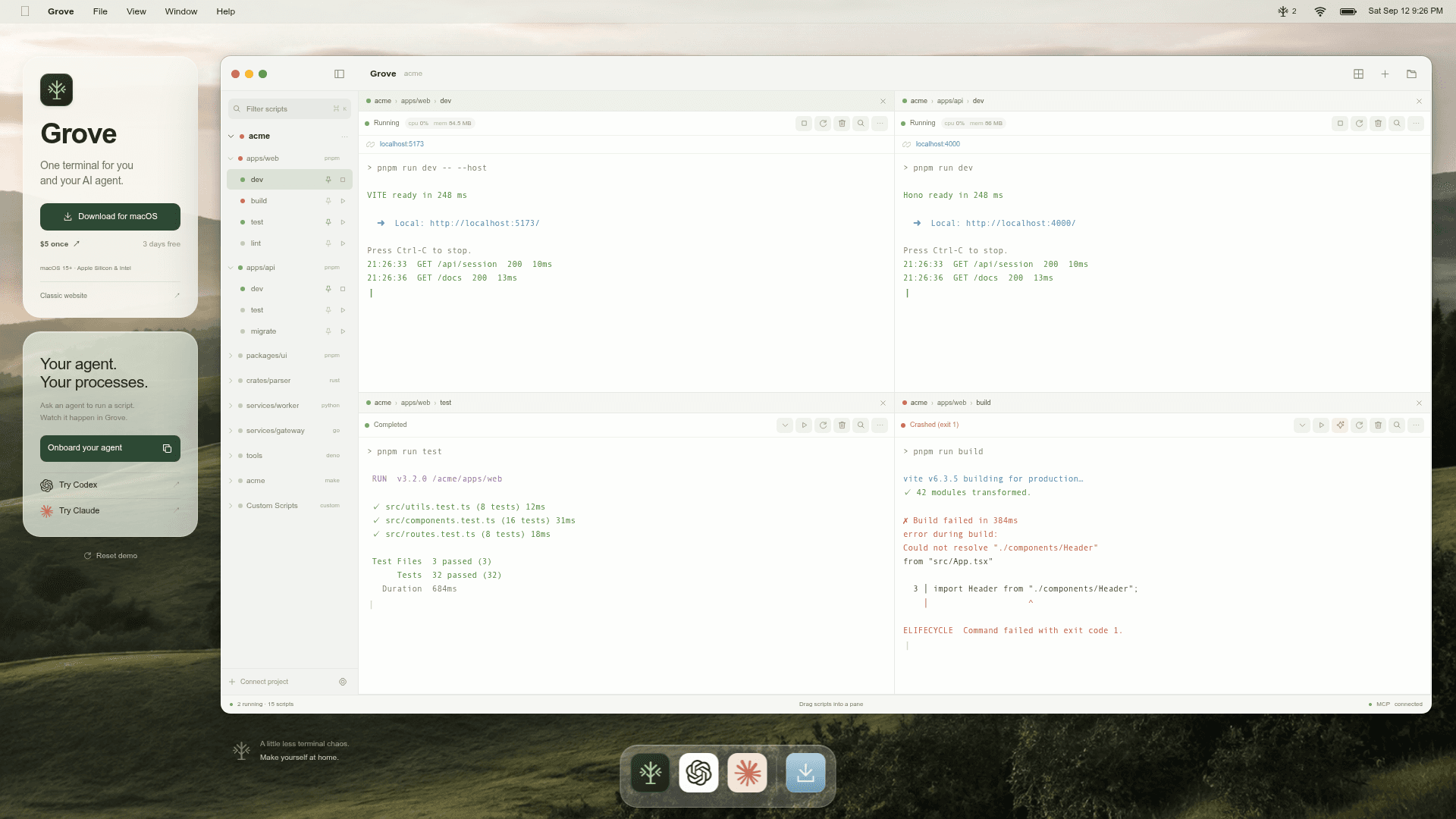
Grove sits between a developer's project and their AI coding agent. Instead of each party opening separate terminals, Grove reads the project's existing manifests — package.json, deno.json, pyproject.toml, Cargo.toml, go.mod, Makefile, and a custom .grove/scripts.json — and surfaces every script in a unified panel. The developer watches the same processes the agent starts, with live logs, detected ports, and exit codes all visible in one place. No new config file is required; Grove follows workspace globs and keeps packages from different ecosystems separate automatically.
How the Agent Integration Works
Grove exposes a local MCP server with seven tools that AI agents such as OpenAI Codex and Anthropic Claude can call to start, inspect, and stop terminal processes. When an agent runs dev, the process appears in the developer's menu bar with the same logs, port link, and stop control they would see if they had started it themselves. The CLI (grove list, grove start, grove logs --follow) communicates with the running Grove app through the same Unix socket, so agent-driven and human-driven actions are always in sync.
Terminal Fidelity and Process Management
Grove runs every script on a pseudo-terminal, preserving colors, progress bars, interactive prompts, and signal handling exactly as they behave in a shell. Up to four live terminal panes can be displayed side by side. When a script is stopped, Grove stops the entire process group, preventing abandoned dev servers or ports that remain open after the parent exits. Grove also resolves the user's interactive shell once at startup and reuses it, so version managers work without adding startup overhead to every script run.
On-Device Log Explanation
Pressing the Explain button sends the tail of a log to Apple's on-device model for a plain-language summary of what went wrong. Grove strips anything shaped like a token or password before the model sees the text. Because the model runs locally, no log content is uploaded to external servers.
Update: Grove 0.5.0
The GitHub releases repository shows version 0.5.0 (Grove 0.5.0) published on 2026-09-08, with the homepage footer displaying v0.3.1 as the current stable reference. The releases repository hosts signed, notarized builds and a Sparkle update feed (appcast.xml) that installed copies poll for automatic updates. Source code lives in a separate private repository; the public grove-releases repo contains only release artifacts.
Community Discussions
Be the first to start a conversation about Grove
Share your experience with Grove, ask questions, or help others learn from your insights.
Pricing
Free Trial
Full access to the app, CLI, and MCP server for 3 days. No credit card or account required.
- Full app access
- CLI included
- Built-in MCP server
- No card or account needed
Grove License
One-time purchase for the app, CLI, and built-in MCP server on up to 3 Macs with automatic updates.
- The app, the CLI, and the built-in MCP server
- Up to 3 of your own Macs
- Automatic updates, signed and notarized
Capabilities
Key Features
- Reads existing project manifests (package.json, deno.json, pyproject.toml, Cargo.toml, go.mod, Makefile, .grove/scripts.json)
- Menu bar popover showing all scripts and their live state
- Built-in MCP server with 7 tools for AI agent control
- CLI (grove list, grove start, grove logs) via local Unix socket
- Up to 4 side-by-side live terminal panes
- Real pseudo-terminal with color, progress bars, and signal support
- Whole process group termination (no orphaned child processes)
- Detected ports become clickable links
- On-device log explanation via Apple's on-device model
- Token/password scrubbing before log explanation
- Automatic updates via Sparkle (signed and notarized builds)
- Supports monorepos with multiple ecosystems
- No new config file required
- Up to 3 Macs per license