
Main Menu
  • Tools
  • Developers
  • Topics
  • Discussions
  • News
  • Blogs
  • Builds
  • Contests
Create
Sign In
    EveryDev.ai
    Sign inSubscribe
    Home
    Tools

    1,775+ AI tools

    • New
    • Trending
    • Featured
    • Compare
    Categories
    • Agents891
    • Coding869
    • Infrastructure377
    • Marketing357
    • Design302
    • Research276
    • Projects271
    • Analytics266
    • Testing160
    • Integration157
    • Data150
    • Security131
    • MCP125
    • Learning124
    • Extensions108
    • Communication107
    • Prompts100
    • Voice90
    • Commerce89
    • DevOps70
    • Web66
    • Finance17
    Sign In
    1. Home
    2. Tools
    3. smux
    smux icon

    smux

    Terminal & Session Management

    One-command tmux setup with terminal automation and a CLI bridge for AI agent-to-agent communication across panes.

    Visit Website

    At a Glance

    Pricing

    Open Source

    Completely free and open-source under the MIT License. Free to use, modify, and distribute.

    Engagement

    Available On

    Windows
    macOS
    Linux
    API
    CLI

    Resources

    WebsiteDocsGitHubllms.txt

    Topics

    Terminal & Session ManagementMulti-agent SystemsAgent Harness

    Alternatives

    Conductortmux-idedmux

    Developer

    ShawnPanaShawnPana builds open-source developer tooling focused on te…

    Listed Mar 2026

    About smux

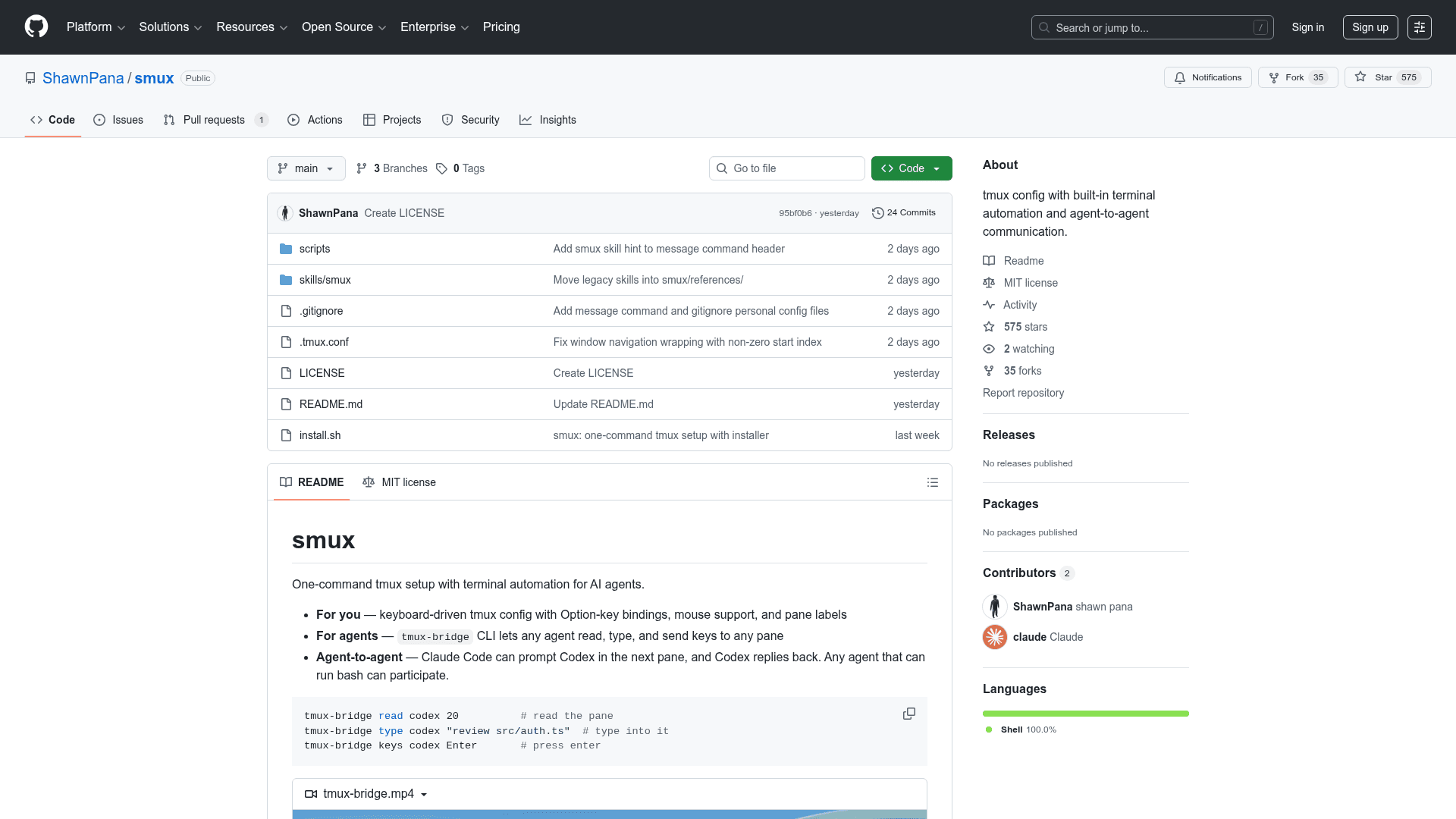
    smux is an open-source tmux configuration and automation toolkit that installs in a single command, providing a keyboard-driven terminal environment with built-in support for AI agent workflows. It ships a tmux-bridge CLI that lets any agent — Claude Code, Codex, Gemini CLI, or a plain shell script — read from, type into, and send keystrokes to any tmux pane. Agents can coordinate directly: one agent can prompt another in an adjacent pane and receive replies, enabling multi-agent terminal workflows without additional infrastructure. Everything installs to ~/.smux/ and works on macOS (via Homebrew) and Linux.

    • One-command install — a single curl | bash installs tmux (if missing), the config, and the tmux-bridge CLI automatically.
    • Option-key bindings — all keybindings use Option (Alt) with no prefix required, covering pane navigation, splitting, layout cycling, and window management.
    • Mouse support — click to select panes, drag to copy text to clipboard, and scroll wheel navigation are all enabled out of the box.
    • tmux-bridge CLI — provides list, read, type, keys, name, resolve, and id subcommands for full cross-pane programmatic control.
    • Agent-to-agent communication — any agent that can run bash can participate; Claude Code can prompt Codex in the next pane and Codex replies back.
    • AI Agent Skills — install the smux skill via npx skills add ShawnPana/smux to teach agents how to use tmux-bridge; compatible with Claude Code, Codex, Cursor, Copilot, and 40+ other agents.
    • Auto-tiling — new panes automatically tile the layout, keeping the workspace organized without manual resizing.
    • Update and uninstall commands — smux update and smux uninstall manage the installation lifecycle cleanly.
    smux - 1

    Community Discussions

    Be the first to start a conversation about smux

    Share your experience with smux, ask questions, or help others learn from your insights.

    Pricing

    OPEN SOURCE

    Open Source

    Completely free and open-source under the MIT License. Free to use, modify, and distribute.

    • tmux-bridge CLI
    • Option-key bindings
    • Mouse support
    • Agent-to-agent communication
    • AI Agent Skills integration
    View official pricing

    Capabilities

    Key Features

    • One-command install via curl
    • tmux-bridge CLI for cross-pane agent communication
    • Option-key bindings with no prefix required
    • Mouse support with auto-copy to clipboard
    • Agent-to-agent communication across panes
    • AI Agent Skills integration via npx skills add
    • Auto-tiling on new pane creation
    • Pane labeling and addressing by name
    • Read, type, and send keys to any pane programmatically
    • Update and uninstall commands
    • Compatible with Claude Code, Codex, Cursor, Copilot, and 40+ agents

    Integrations

    Claude Code
    OpenAI Codex
    Gemini CLI
    Cursor
    GitHub Copilot
    Homebrew
    apt
    dnf
    pacman
    apk
    API Available
    View Docs

    Reviews & Ratings

    No ratings yet

    Be the first to rate smux and help others make informed decisions.

    Developer

    ShawnPana

    ShawnPana builds open-source developer tooling focused on terminal automation and AI agent workflows. The smux project provides a one-command tmux setup with a CLI bridge enabling multi-agent communication across terminal panes. The project is hosted on GitHub under the MIT License and supports macOS and Linux environments.

    Read more about ShawnPana
    WebsiteGitHub
    1 tool in directory

    Similar Tools

    Conductor icon

    Conductor

    Run a team of parallel coding agents on your Mac with isolated workspaces for Codex and Claude Code.

    tmux-ide icon

    tmux-ide

    A CLI tool that turns any project into a tmux-powered terminal IDE, orchestrating Claude agent teams in coordinated panes via a single YAML config.

    dmux icon

    dmux

    Manage multiple AI coding agents in isolated git worktrees using tmux for parallel development, branching, and merging.

    Browse all tools

    Related Topics

    Terminal & Session Management

    Terminal emulators, multiplexers, and session managers that help developers run parallel AI coding agents, manage multiple workspaces, and maintain persistent terminal sessions.

    14 tools

    Multi-agent Systems

    Platforms for creating and managing teams of AI agents that can collaborate.

    84 tools

    Agent Harness

    Infrastructure, orchestrators, and task runners that wrap around LLM coding agents — covering session management, context delivery, worktree isolation, architecture enforcement, and issue-to-PR pipelines.

    40 tools
    Browse all topics
    Back to all tools
    Explore AI Tools
    • AI Coding Assistants
    • Agent Frameworks
    • MCP Servers
    • AI Prompt Tools
    • Vibe Coding Tools
    • AI Design Tools
    • AI Database Tools
    • AI Website Builders
    • AI Testing Tools
    • LLM Evaluations
    Follow Us
    • X / Twitter
    • LinkedIn
    • Reddit
    • Discord
    • Threads
    • Bluesky
    • Mastodon
    • YouTube
    • GitHub
    • Instagram
    Get Started
    • About
    • Editorial Standards
    • Corrections & Disclosures
    • Community Guidelines
    • Advertise
    • Contact Us
    • Newsletter
    • Submit a Tool
    • Start a Discussion
    • Write A Blog
    • Share A Build
    • Terms of Service
    • Privacy Policy
    Explore with AI
    • ChatGPT
    • Gemini
    • Claude
    • Grok
    • Perplexity
    Agent Experience
    • llms.txt
    Theme
    With AI, Everyone is a Dev. EveryDev.ai © 2026
    Sign in